
Quick verdict
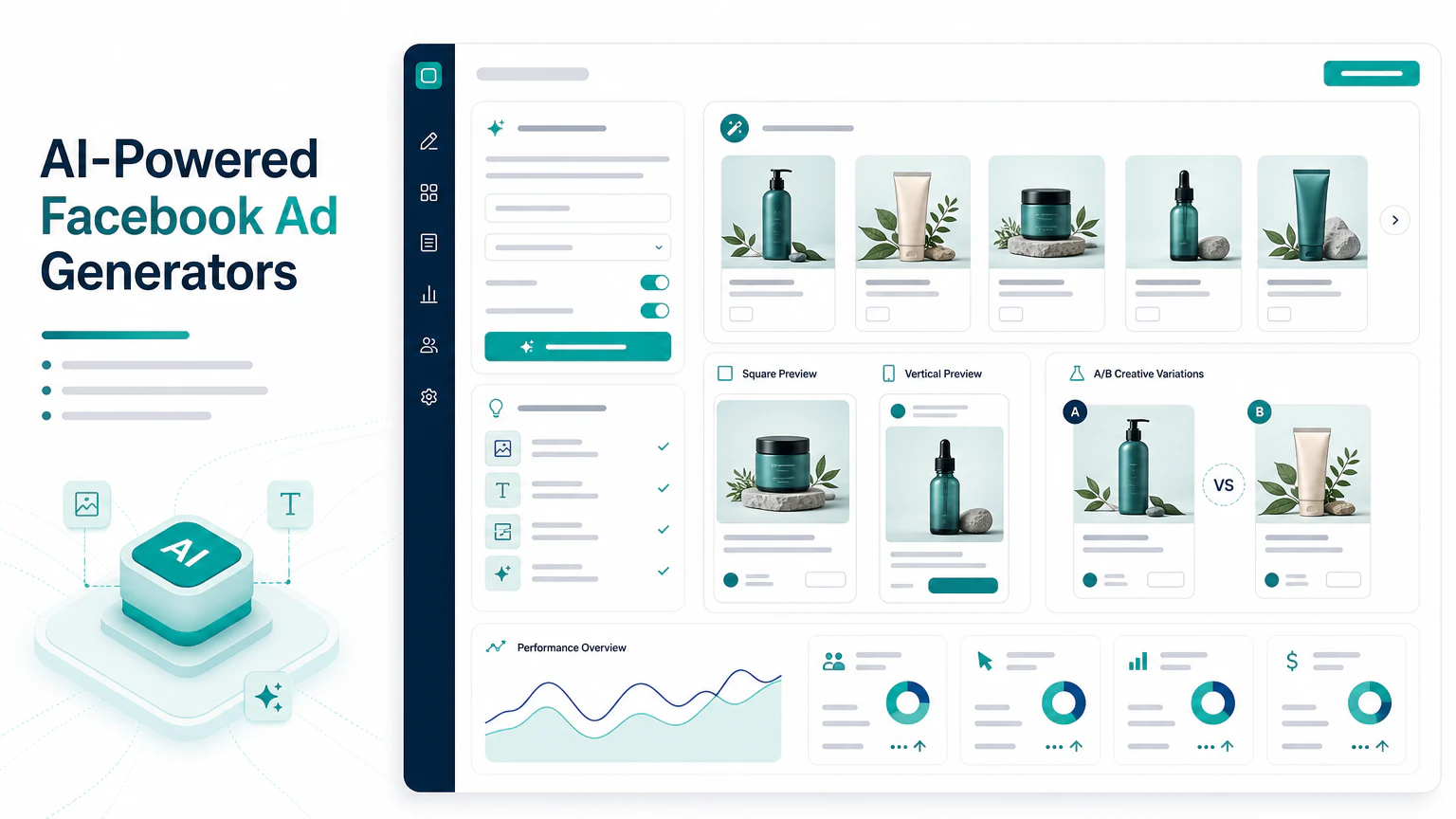
The best AI Facebook ad generator depends on what part of the ad you need:
- For static ad creatives: AdCreative.ai or Canva.
- For product video ads: Creatify.
- For UGC-style Facebook ads: Arcads.
- For avatar explainers: HeyGen.
- For fast video edits and captions: VEED or InVideo AI.
This page covers Facebook ad generation broadly: copy, visuals, static ads, video ads, UGC-style ads, and Meta-ready formats. If you only need video tools, read best AI Facebook ad video generators.
Comparison table
| Tool | Best for | Strength | Limit to watch |
|---|---|---|---|
| AdCreative.ai | Static Facebook ads | Ad creative variations | Review brand fit and claims |
| Canva | Small business creatives | Easy layouts and templates | Less performance-specific |
| Creatify | Facebook video ads | Product-led video generation | Needs claim review |
| Arcads | UGC-style Facebook ads | Creator-style formats | Trust and disclosure matter |
| HeyGen | Avatar explainers | Presenter-led videos | Script must stay short |
| InVideo AI | Simple video ads | Fast assembly | Can look template-like |
| VEED | Editing and captions | Social polish | Not a full campaign workflow |
What an AI Facebook ad generator should create
A useful AI Facebook ad generator can help with:
- headlines,
- primary text,
- static ad images,
- product visuals,
- video ads,
- UGC-style scripts,
- captions,
- CTA variations,
- square and vertical formats.
The best tool depends on whether your bottleneck is copy, design, video, or testing.
1. AdCreative.ai
AdCreative.ai is a strong option to evaluate when you need many static Facebook ad variations quickly.

Best for
- Static ad creatives.
- Hook and copy variations.
- Ecommerce campaigns.
- Performance creative testing.
Watch out for
Do not publish AI-generated claims without review. The creative still needs to match the product and landing page.
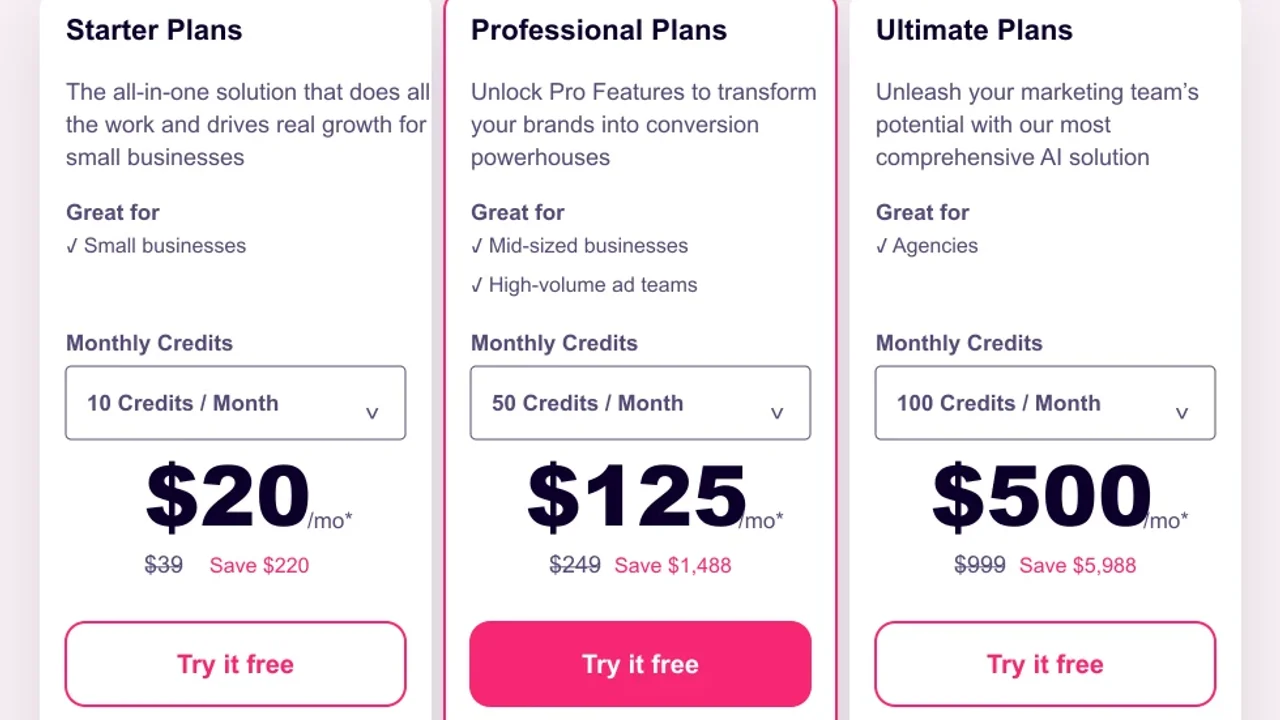
Pricing screenshot note: AdCreative.ai prices and discounts can change and may vary by region, currency, taxes, billing cycle, promotions, and account type, so verify the current plan details on the official site before buying.
2. Canva
Canva is useful for small businesses that need simple Facebook ads, banners, social posts, and visuals without a designer.

Pricing note: Canva pricing and AI feature access can vary by plan, region, currency, taxes, billing cycle, promotions, team type, and rollout status, so verify the current Canva plan details before buying.
Best for
- Beginner-friendly ad design.
- Static creatives.
- Simple video edits.
- Brand templates.
Watch out for
Templates are convenient, but they can look generic. Add a specific product angle.
3. Creatify
Creatify fits Facebook video ads where the product is the center of the creative.
Best for
- Product videos.
- Ecommerce Facebook ads.
- Product page to ad workflows.
- Short campaign variations.
Watch out for
Check product benefits, prices, discounts, and CTAs before launch.
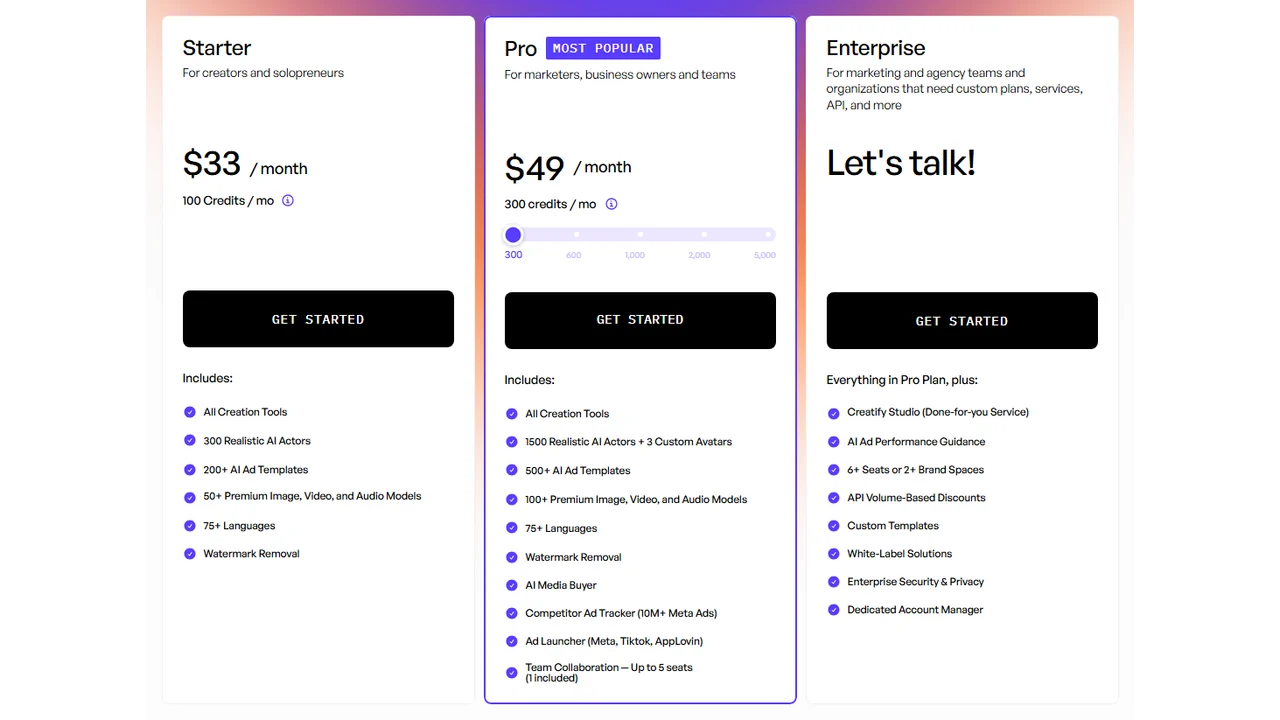
Pricing screenshot note: Creatify prices, credits, AI actor access, template limits, ad guidance, API discounts, and enterprise terms can change and may vary by region, currency, taxes, billing cycle, promotions, and account type, so verify the current details on the official site before buying.
4. Arcads
Arcads is useful when you want Facebook ads that feel closer to creator content than polished brand creative.
Best for
- UGC-style Facebook ads.
- DTC products.
- Short social hooks.
- Script testing.
Watch out for
Do not use AI UGC as fake customer proof. Keep synthetic content transparent and accurate.
5. HeyGen, InVideo AI, and VEED
Use HeyGen, InVideo AI, and VEED when you need presenter-led videos, assembled social videos, captions, or edits.
For assembled social videos, InVideo AI is the simple video-generation option in this group.
For captioned edits and social video polish, VEED is the more editing-focused option in this group.
Best for
- Avatar explainers.
- Captioned Facebook videos.
- Retargeting creatives.
- Simple video variants.
Watch out for
Facebook ads often run without sound. Captions and first-frame clarity matter.
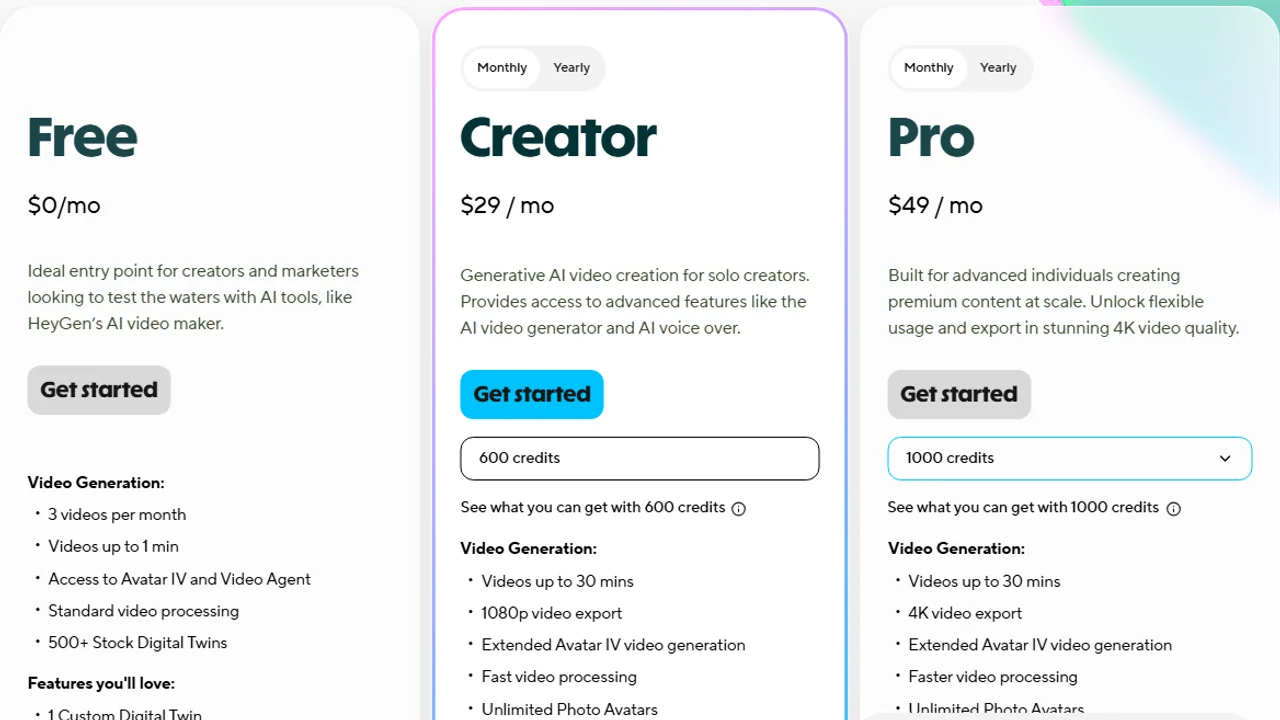
Pricing screenshot note: HeyGen prices, credits, and plan limits can change and may vary by region, currency, taxes, billing cycle, promotions, and account type, so verify the current details on the official site before buying.
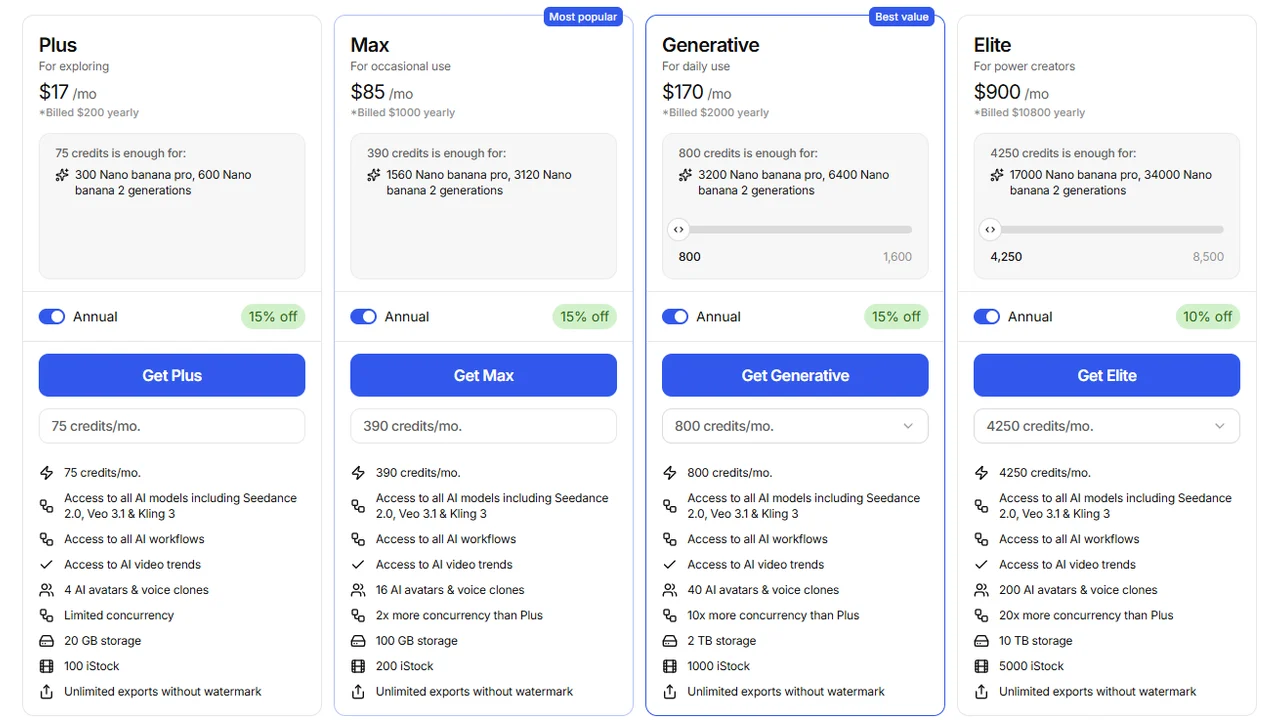
Pricing screenshot note: InVideo prices, credits, and plan limits can change and may vary by region, currency, taxes, billing cycle, promotions, and account type, so verify the current details on the official site before buying.
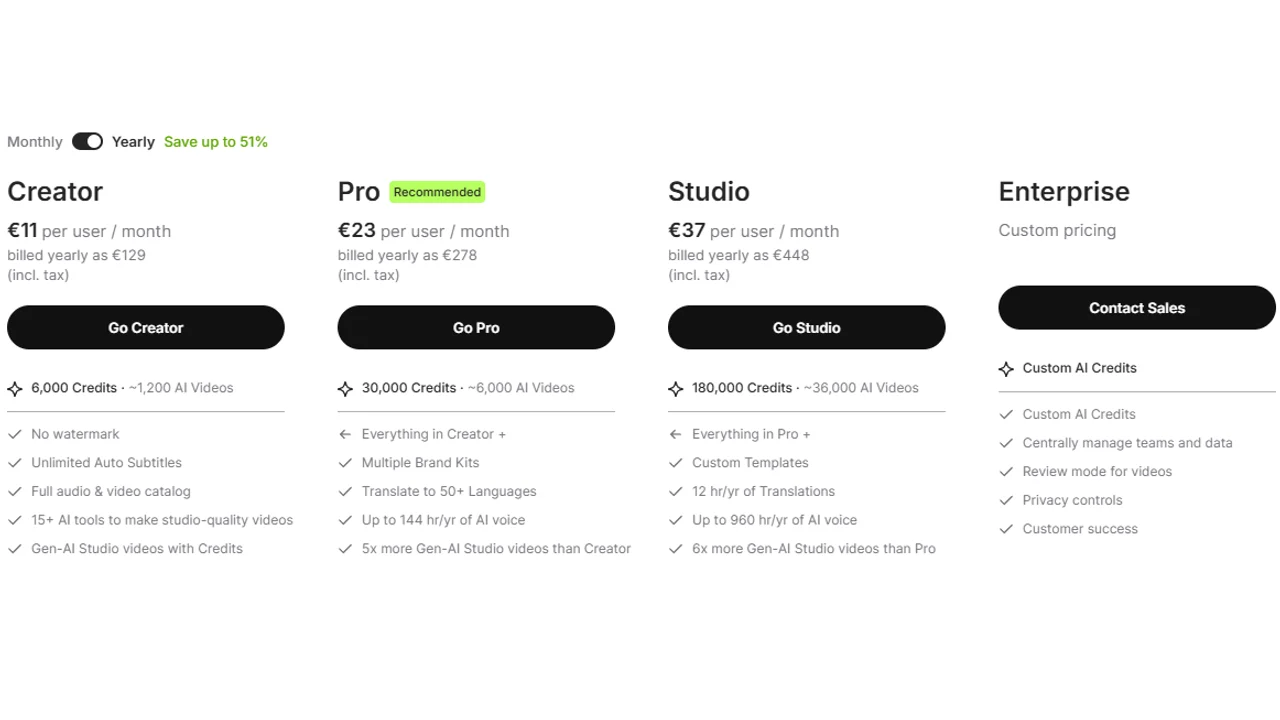
Pricing screenshot note: VEED prices, plan names, and usage limits can change and may vary by region, currency, taxes, billing cycle, promotions, and account type, so verify the current details on the official site before buying.
How to choose
- Need static Facebook ads? Try AdCreative.ai or Canva.
- Need Facebook video ads? Read best AI Facebook ad video generators.
- Need UGC-style ads? Try Arcads.
- Need product video ads? Try Creatify.
- Need a step-by-step process? Read how to create Facebook ads with AI.
Facebook ad checklist
Before launch:
- The offer is clear.
- The image or video works on mobile.
- Captions are readable.
- The CTA matches the landing page.
- Claims are accurate.
- The asset fits Meta placements.
- You have more than one variation to test.
Related: for every channel, not only Meta, compare the best AI ad generators.
FAQ
Which tool should I use for Facebook Ads with AI?
For static creatives, start with AdCreative.ai or Canva. For product video, Creatify is more specific. For a UGC format, Arcads may fit better.
Can I create Facebook ads with AI alone?
You can generate most of the material with AI, but review strategy, claims, product, landing page, and policies before publishing. AI speeds up production; it does not validate the offer on its own.
What is the difference between Facebook Ads and Meta Ads?
Facebook Ads usually refers to ads on Facebook, while Meta Ads covers Meta’s wider ad ecosystem, including Facebook, Instagram, and other placements.
Is image or video better for Facebook Ads?
It depends on the product and funnel stage. A good first test compares a static creative, a product video, and a UGC version with the same core message.
Does this guide replace the how-to?
No. This guide compares tools. For the full process of brief, copy, creatives, video, review, and testing, read how to create Facebook ads with AI.
Final recommendation
For Facebook, do not rely on one creative type. Create one static ad, one product video, and one UGC-style version, then test the message before scaling.