
Quick verdict
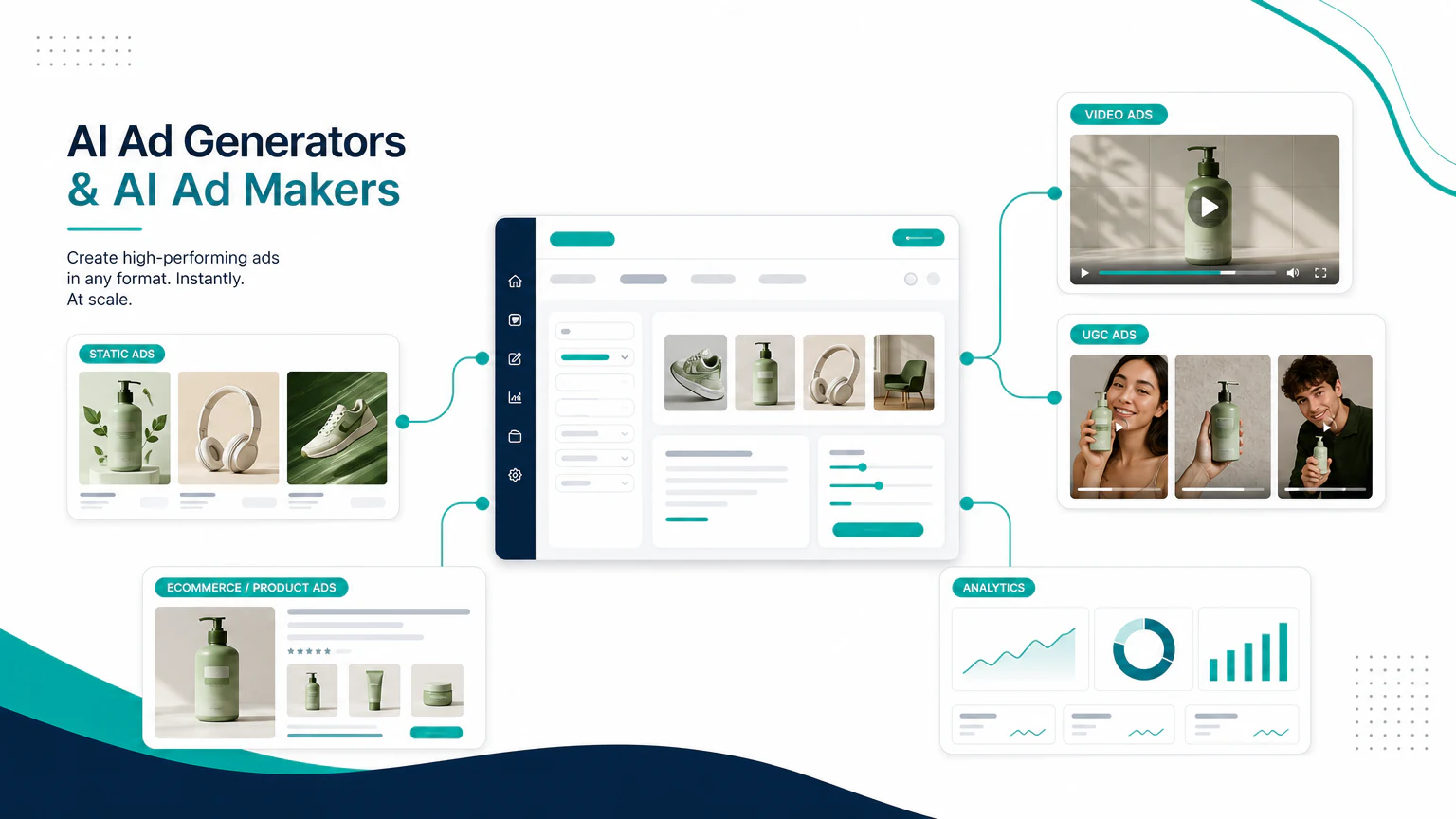
The best AI ad generator depends on the type of creative you need. Searchers use different terms for this category, including AI ad maker, AI advertisement generator, AI ads generator, and AI ad creative generator, but the buying decision is the same: what kind of ad do you need to create?
If your main search is specifically “AI ad maker,” start with the dedicated guide to best AI ad maker tools first, then use this page for the broader generator landscape.
- For static ad variations: AdCreative.ai, Canva, Predis.ai, or Picmaker MAD.
- For native Meta and Google workflows: Meta Advantage+ Creative and Google asset tools inside their ad platforms.
- For product video ads: Creatify.
- For UGC-style ads: Arcads or HeyGen.
- For enterprise creative automation: Smartly.io or Abyssale.
There is no single “best AI ad generator” for every advertiser. A solo founder, Shopify brand, agency, and enterprise media team need different workflows.
What an AI ad generator can create
AI ad generators and AI ad makers can help create:
- headlines,
- primary text,
- product visuals,
- static ads,
- video ads,
- UGC-style videos,
- platform-specific sizes,
- creative variations for testing,
- AI generated ads for early campaign testing.
The best use case is not replacing strategy. It is reducing the time between idea, creative variation, and launch.
Comparison table
| Tool | Best for | Strength | Limit to watch |
|---|---|---|---|
| AdCreative.ai | Static ad testing | Generates many creative variations | Review claims and brand fit |
| Canva Magic Studio | Beginners | Easy design workflow | Less performance-marketing specific |
| Meta Advantage+ Creative | Meta advertisers | Optimizes and adapts creative inside Meta Ads Manager | Not a standalone ad generator; limited outside Meta |
| Google asset tools | Google advertisers | Native to Google campaigns | Best inside Google Ads workflows |
| Predis.ai | Social ads and posts | Social-first creative production | Can feel template-driven |
| Picmaker MAD | Budget ad creation | Simple ad-making workflow | Less advanced for complex teams |
| Creatify | Product video ads | Product-led video generation | Needs message and claim review |
| Arcads | UGC-style ads | Creator-style video variations | Trust and disclosure matter |
| Smartly.io | Enterprise creative | Large-scale automation | Overkill for small teams |
| Abyssale | Creative automation | Templates and production systems | Less focused on video/UGC |
Static AI ad generators and AI ad makers
Static ad generators are useful for Meta, Google Display, LinkedIn, Pinterest, and social creative variations. This is the closest match for searches like “AI ad maker,” “AI ad creative generator,” and “AI generated ad creative.”
AdCreative.ai
AdCreative.ai is best to evaluate when you need many static ad variations for testing. It is more performance-marketing focused than a general design tool.

Use it for:
- campaign variations,
- quick creative ideation,
- ad copy and layout combinations,
- performance testing workflows.
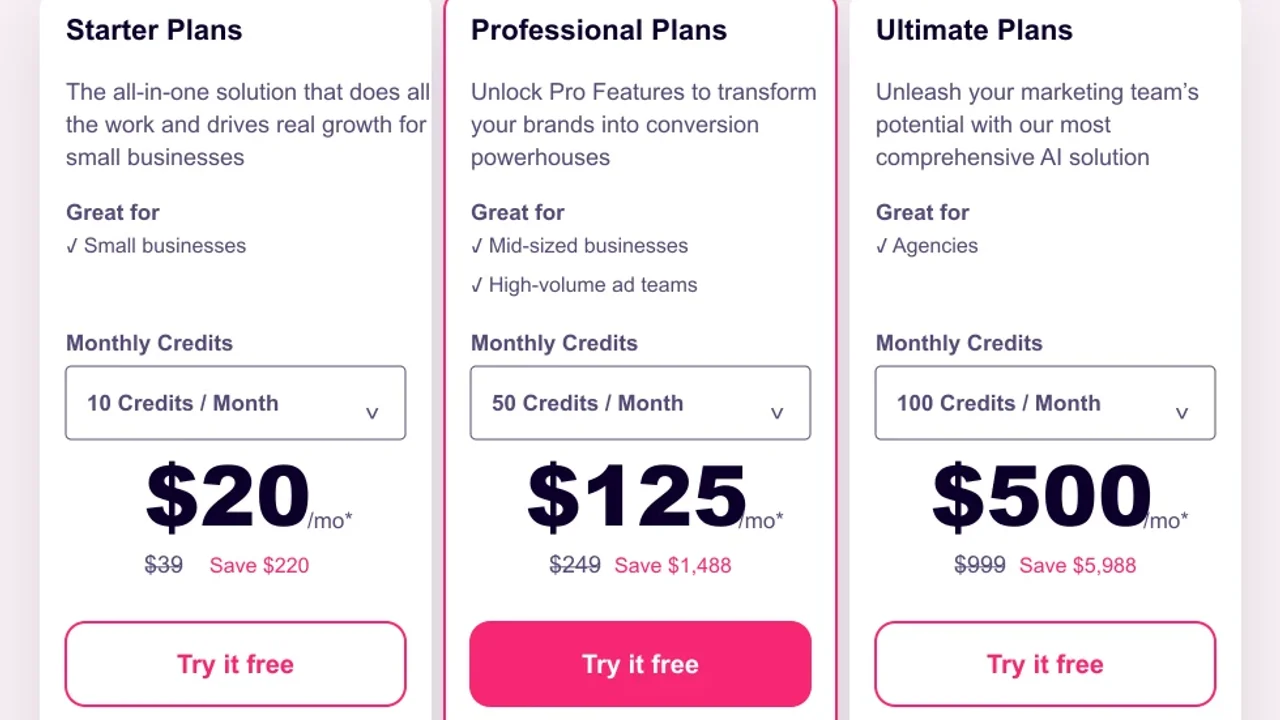
Pricing screenshot note: AdCreative.ai prices and discounts can change and may vary by region, currency, taxes, billing cycle, promotions, and account type, so verify the current plan details on the official site before buying.
Canva Magic Studio
Canva is a good AI ad maker choice for beginners and small teams that need ads, social posts, banners, and simple brand assets in one place.

Use it for:
- fast visual layouts,
- simple social creatives,
- small business ads,
- non-designer workflows.
Pricing note: Canva pricing and AI feature access can vary by plan, region, currency, taxes, billing cycle, promotions, team type, and rollout status, so verify the current Canva plan details before buying.
Predis.ai and Picmaker MAD
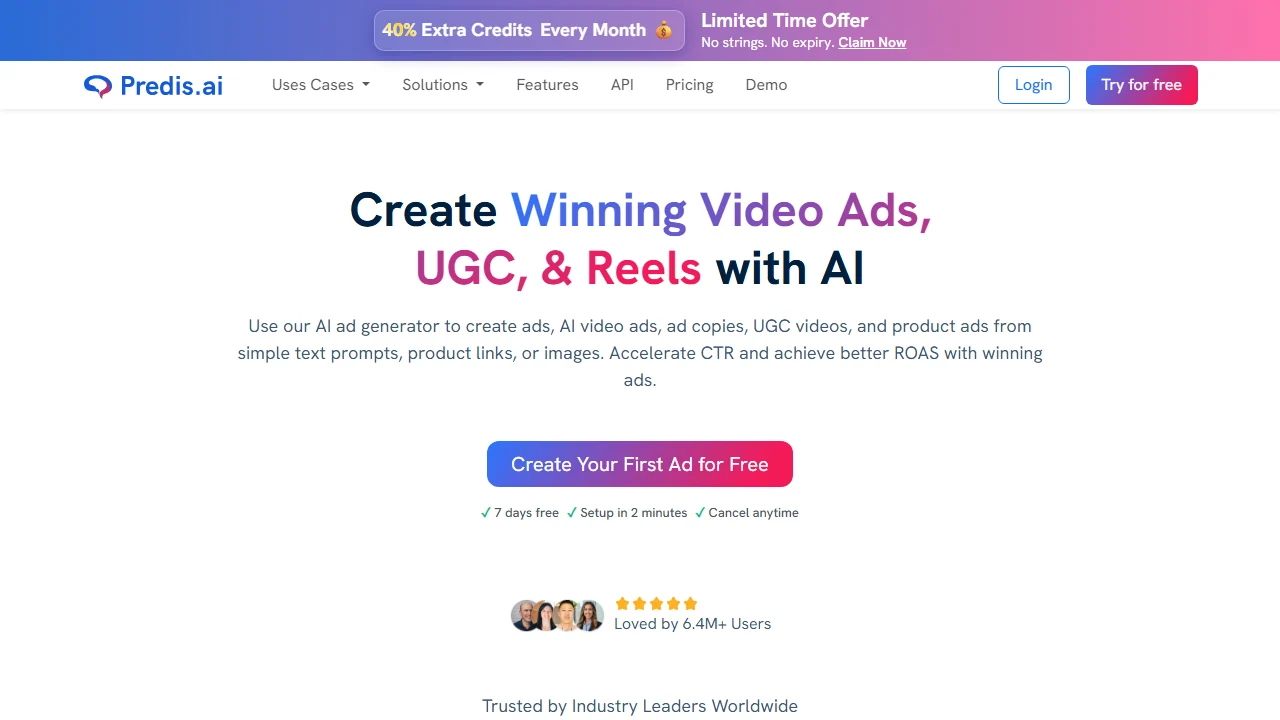
Predis.ai and Picmaker MAD are worth considering if you need social-first creative production and do not want a complex enterprise workflow.
Use them for:
- social post variations,
- basic ad creatives,
- quick campaign drafts,
- budget-conscious production.
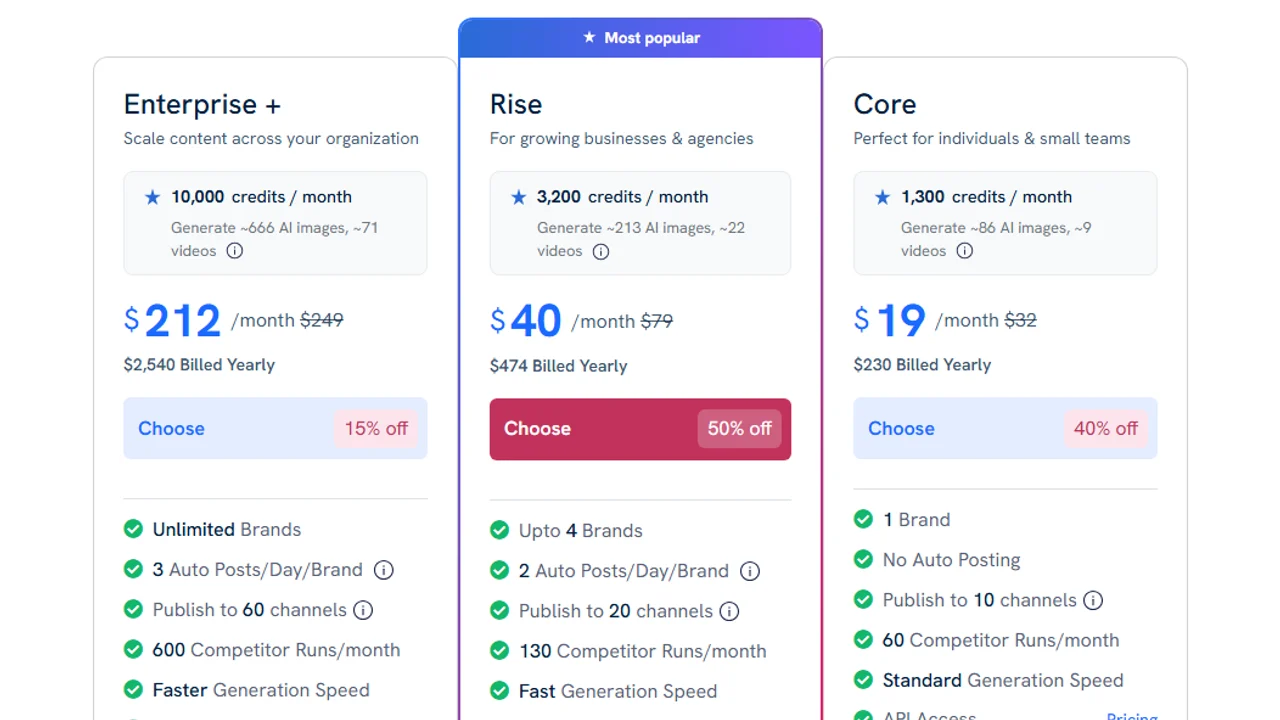
Pricing screenshot note: Predis.ai prices, discounts, and credit limits can change and may vary by region, currency, taxes, billing cycle, promotions, and account type, so verify the current details on the official site before buying.

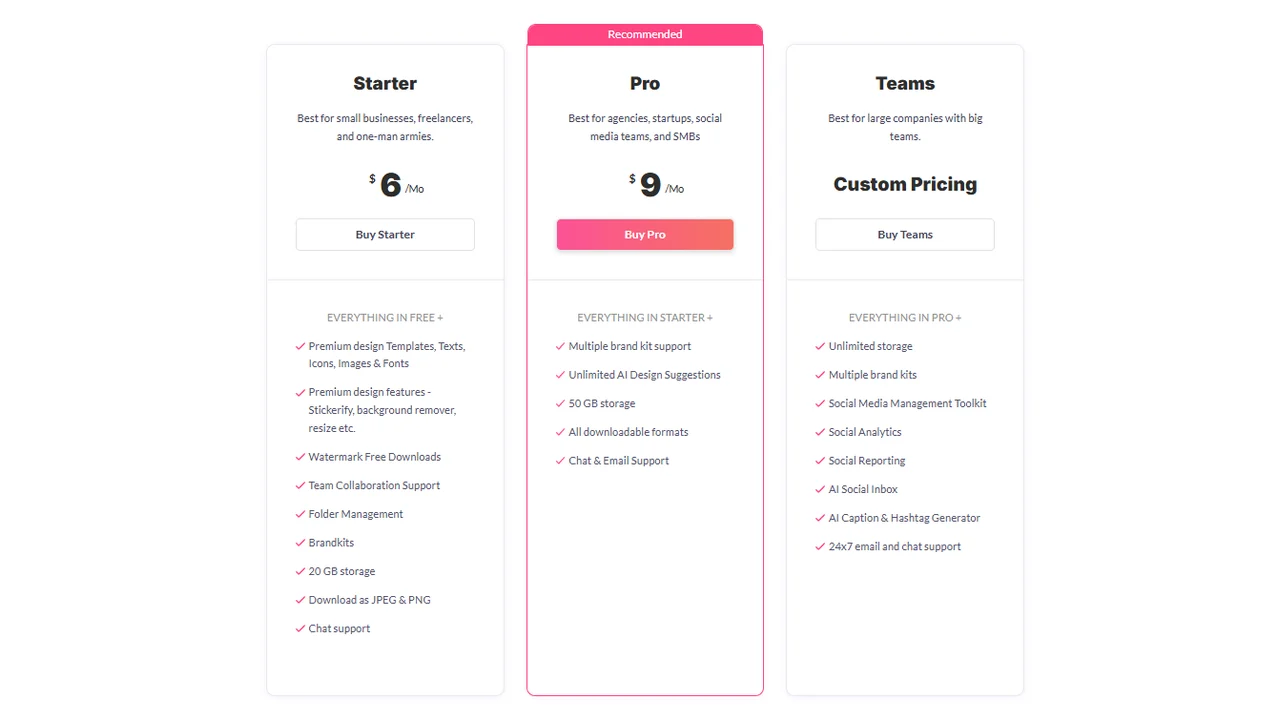
Pricing screenshot note: Picmaker prices, included storage, brand kits, AI suggestions, and team features can change and may vary by region, currency, taxes, billing cycle, promotions, and account type, so verify the current details on the official site before buying.
Native platform tools for Facebook and Google ads
Native platform tools are not always marketed as standalone AI ad generators, but they matter because they sit inside the ad platforms themselves.
Meta Advantage+ Creative
Meta Advantage+ Creative is most relevant if you already run Facebook and Instagram ads. It is not a standalone AI ad generator; it is a native layer inside Meta Ads Manager that can adapt, optimize, and vary creative within Meta’s ecosystem.
If your search is specifically “AI Facebook ad generator,” start here for Meta-native optimization, then compare it with standalone tools if you also need assets for TikTok, Google, LinkedIn, or landing pages.
Google asset generation
Google asset tools are most relevant if your campaigns already live inside Google Ads, Performance Max, Display, or YouTube workflows.
The advantage of native tools is convenience. The limitation is that they usually do not replace a broader creative workflow across channels.
Video and UGC AI ad generators
If you need movement, presenters, demos, or creator-style ads, look beyond static generators. Queries like “AI product video generator,” “AI marketing video generator,” and “AI TikTok ad generator” usually belong in this part of the workflow.
Creatify
Creatify is a better fit for product video ads, especially when you want to move from product input to short ad concepts quickly.
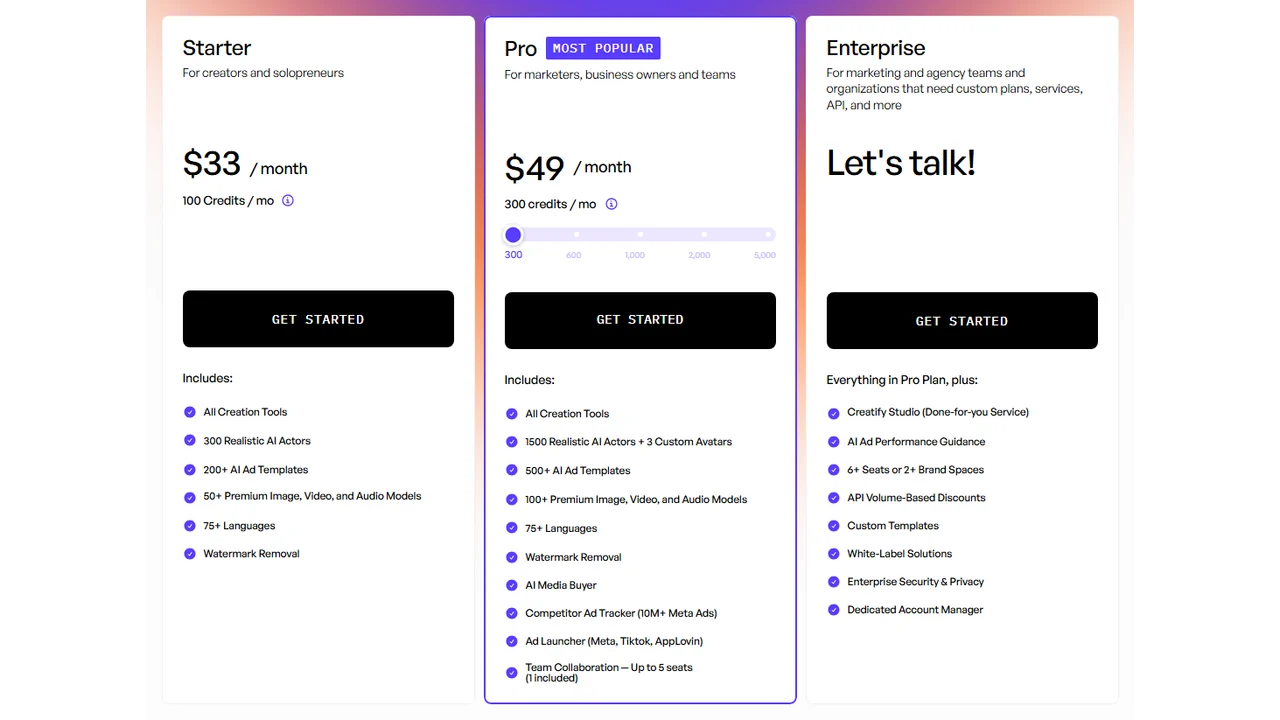
Pricing screenshot note: Creatify prices, credits, AI actor access, template limits, ad guidance, API discounts, and enterprise terms can change and may vary by region, currency, taxes, billing cycle, promotions, and account type, so verify the current details on the official site before buying.
Arcads and HeyGen
Arcads and HeyGen are better fits for UGC-style or avatar-led videos. They are useful for testing hooks, scripts, and localized presenter ads.
If this is your main format, compare the dedicated guides:
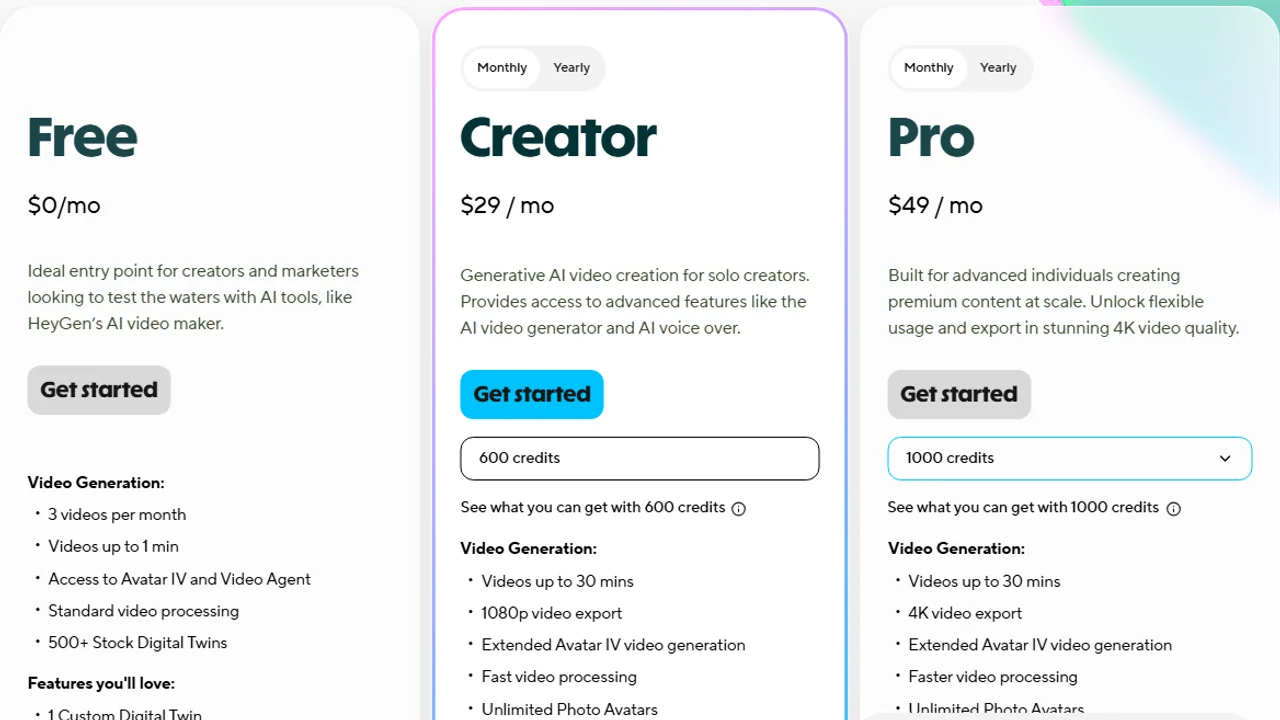
Pricing screenshot note: HeyGen prices, credits, and plan limits can change and may vary by region, currency, taxes, billing cycle, promotions, and account type, so verify the current details on the official site before buying.
Enterprise creative automation
Enterprise teams usually need more than one-off ad creation. They need permissions, brand systems, templates, feeds, localization, approvals, and large-scale versioning.
Smartly.io
Smartly.io is a better fit for enterprise advertisers and agencies managing large paid social operations.
Pricing note: Smartly.io did not show public pricing during this research, and package terms can vary by region, currency, contract, account type, and service scope, so teams should contact Smartly.io or review the current website for enterprise pricing details.
Abyssale
Abyssale is useful for creative automation workflows where teams need to generate many assets from templates, data, and brand rules.
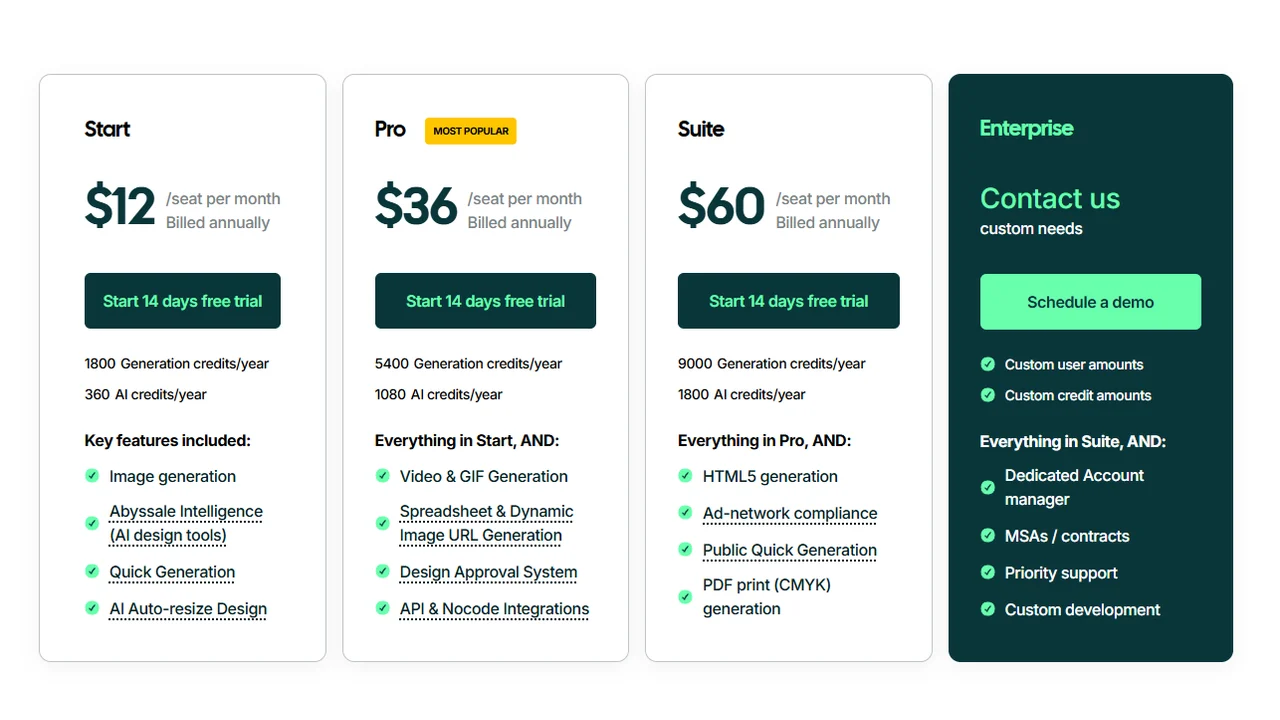
Pricing screenshot note: Abyssale prices, generation credits, AI credits, seats, and enterprise options can change and may vary by region, currency, taxes, billing cycle, promotions, and account type, so verify the current details on the official site before buying.
These platforms can be powerful, but they are usually too heavy for small teams that only need a few ads per week.
How to choose the right AI ad generator
Use this decision path:
- Need product photos first? Start with an AI product photo generator.
- Need static ads? Compare AdCreative.ai, Canva, Predis.ai, and Picmaker MAD, or read best AI ad creative generators.
- Need Instagram-specific ads? Read best Instagram ad creator tools and Instagram lead gen ads.
- Need video ads? Compare Creatify, Runway, InVideo AI, and Pictory, or read best AI video ad generators.
- Need ecommerce video ads? Read best AI ecommerce video generators.
- Need product video tools? Read best AI product video generators.
- Need TikTok ads? Read best AI TikTok ad generators.
- Need Facebook ads? Read best AI Facebook ad generators.
- Need Facebook video ads? Read best AI Facebook ad video generators.
- Need UGC-style ads? Compare Arcads, HeyGen, Synthesia, and D-ID.
- Need avatar-led ads? Read best AI avatar ad generators.
- Need enterprise automation? Compare Smartly.io and Abyssale.
- Need a full workflow? Follow how to create ads with AI.
Common mistakes
Avoid these traps:
- choosing a tool before defining the ad format,
- using AI copy without checking claims,
- launching generic creatives that look like templates,
- ignoring platform policies,
- relying on one ad variation,
- using synthetic UGC as fake customer proof,
- publishing product visuals that alter the product.
FAQ
What is the best AI ad generator?
It depends on the format. For static ads, AdCreative.ai or Canva. For product video, Creatify. For UGC, Arcads or HeyGen. For large teams, Smartly.io or Abyssale.
Can I create ads with AI for free?
You can start with tools that offer free plans or trials, but the limits change. For real campaigns, always check usage rights, export, watermarks, and generation caps.
Do these work for Facebook Ads and Google Ads?
Yes, but not every tool works the same way. Some generate external assets and others work inside Meta or Google. Check formats, sizes, claims, and the landing page before launching.
Can AI create UGC ads?
It can create scripts, avatars, and creator-style video. The key is not to present it as a real testimonial if it is not one.
Which tool should I use if I sell ecommerce?
Start with a strong product image, then create a static creative, a product video, and a UGC variant. Photoroom or Pebblely, AdCreative.ai, Creatify, and Arcads each cover different parts of that flow.
Final recommendation
For most small brands, the best stack is simple:
- Generate or improve product images.
- Write multiple hooks and angles.
- Create static ads.
- Create video or UGC-style variants.
- Test the clearest messages first.
AI ad generators are most valuable when they help you produce more useful variations, not when they make creative decisions for you.