

Quick verdict
The best AI ecommerce video generator depends on the video you need:
- For product-page-to-video workflows: Creatify.
- For UGC-style ecommerce ads: Arcads.
- For avatar product explanations: HeyGen.
- For professional presenter videos: Synthesia.
- For simple product and social videos: InVideo AI, Pictory, or VEED.
Ecommerce video is different from generic AI video. The product must stay accurate, the offer must be clear, and the output needs to fit paid social, product pages, email, and marketplace content.
If you need tools beyond video, compare the broader guide to AI tools for ecommerce and Shopify.
Comparison table
| Tool | Best for | Strength | Limit to watch |
|---|---|---|---|
| Creatify | Product video ads | Turns product inputs into ad concepts | Review claims and landing-page accuracy |
| Arcads | UGC-style ecommerce ads | Creator-style formats | Trust and disclosure matter |
| HeyGen | Avatar product explainers | Presenter-led demos and localization | Script quality drives the result |
| Synthesia | Professional videos | Polished business-style presenters | Less native to raw social ads |
| InVideo AI | Simple social videos | Fast video assembly | Can look template-based |
| Pictory | Repurposing content | Turns text and existing content into video | Better for summaries than product demos |
| VEED | Editing and social assets | Useful for captions and editing | Not always a full ad generator |
Where ecommerce video actually gets used
Unlike a generic video tool, an ecommerce video generator has to feed the places that sell:
- Product pages (PDP): short demos that lift conversion on the page itself.
- Paid social: vertical ads for TikTok, Reels, and Meta, in many variations for testing.
- Marketplaces: listing videos for Amazon, Etsy, or Walmart, each with its own specs.
- Email and retention: product clips for launches, restocks, and abandoned-cart flows.
- Catalog at scale: the same template applied across dozens or hundreds of SKUs.
The goal is not cinematic output. It is a video that helps a shopper understand the product faster and buy.
1. Creatify
Creatify is one of the clearest tools to evaluate for ecommerce video because it is close to the product ad workflow.

Best for
- Shopify and DTC brands.
- Product video ads.
- Product-page-to-ad workflows.
- Fast creative variations.
Watch out for
Do not publish without checking product claims, discount language, and whether the generated script matches the actual landing page.
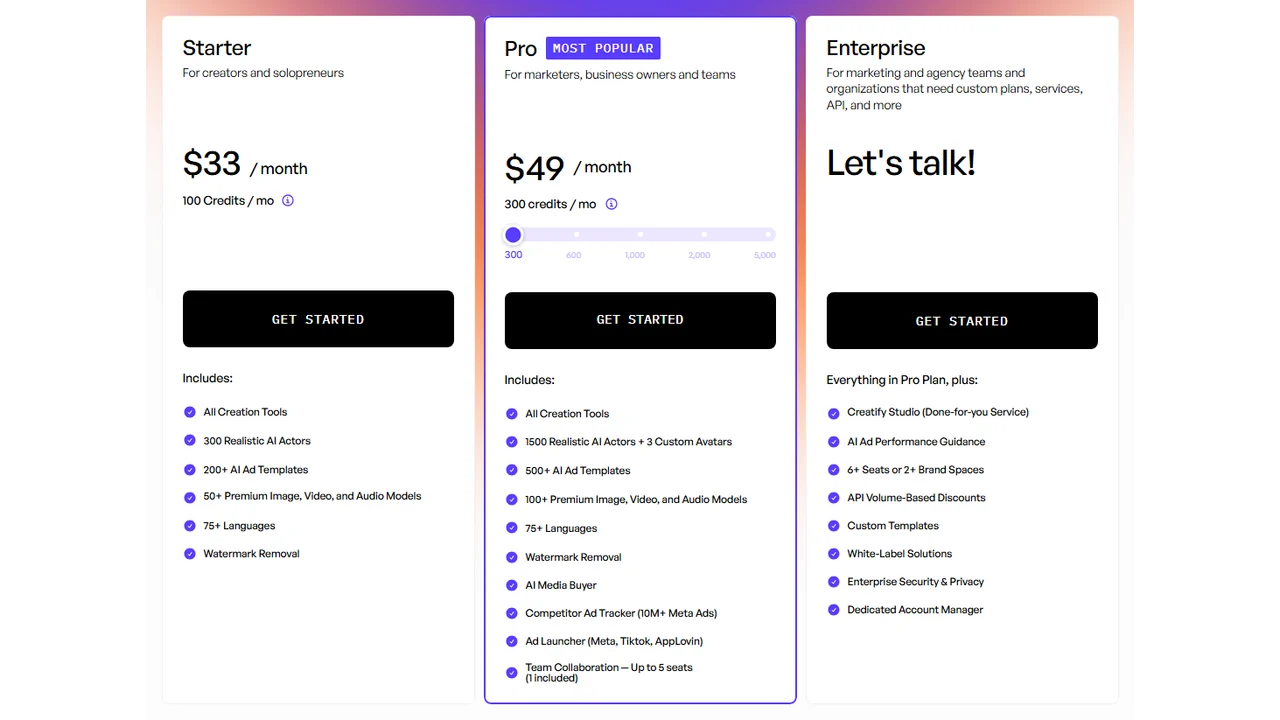
Pricing screenshot note: Creatify prices, credits, AI actor access, template limits, ad guidance, API discounts, and enterprise terms can change and may vary by region, currency, taxes, billing cycle, promotions, and account type, so verify the current details on the official site before buying.
2. Arcads
Arcads fits ecommerce brands that want UGC-style video ads without filming every variation with a creator.

Best for
- TikTok-style product pitches.
- Direct-response hooks.
- UGC-style product explanations.
- Brands testing multiple scripts.
Watch out for
AI UGC can help with speed, but real customer proof is still stronger when trust is the main selling point.
3. HeyGen
HeyGen is useful when your ecommerce video needs a presenter: a founder-style explanation, product education, FAQ-style ad, or localized version.
Best for
- Avatar product explainers.
- Multilingual ecommerce ads.
- Founder-style product videos.
- Product education.
Watch out for
Keep scripts short. Avatar ads become weak when they sound like a long landing page read out loud.
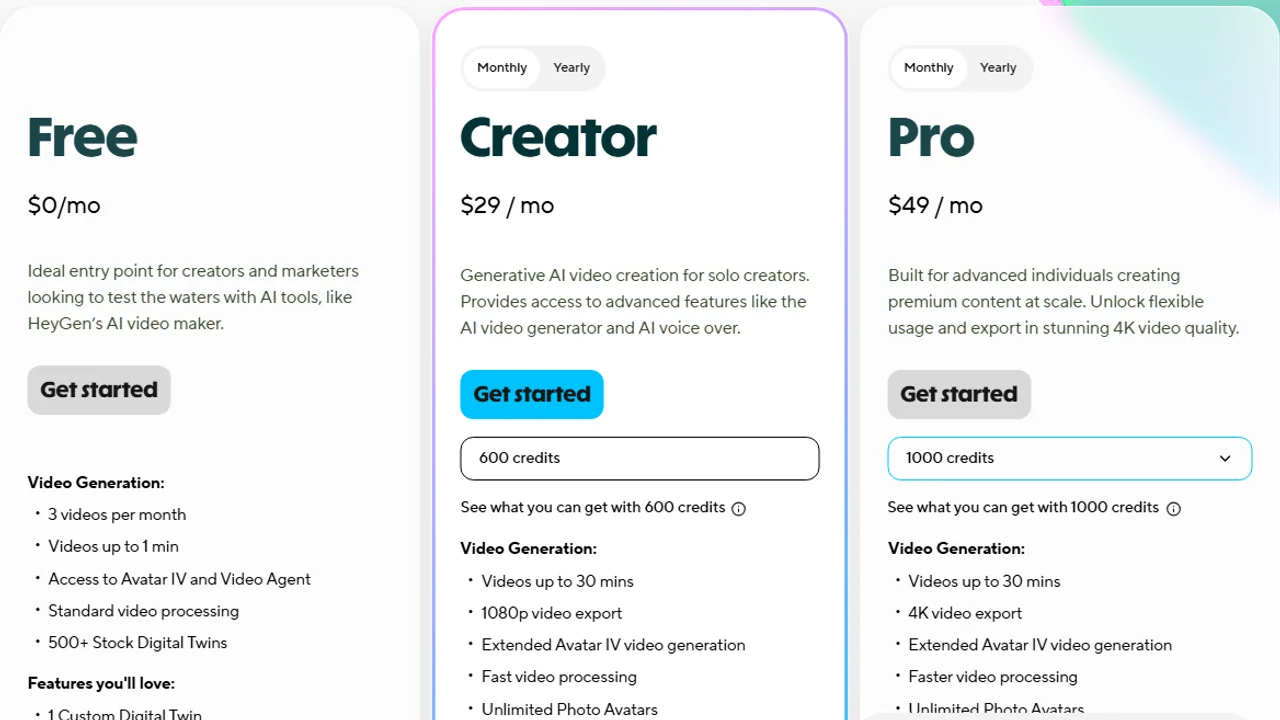
Pricing screenshot note: HeyGen prices, credits, and plan limits can change and may vary by region, currency, taxes, billing cycle, promotions, and account type, so verify the current details on the official site before buying.
4. Synthesia
Synthesia is better for polished presenter videos than raw social content. It can work for ecommerce when the product needs education or trust-building.
Best for
- B2B ecommerce.
- Product explainers.
- Training-style product videos.
- Professional presenter ads.
Watch out for
If you need fast, native-looking TikTok content, a more social-first tool may fit better.
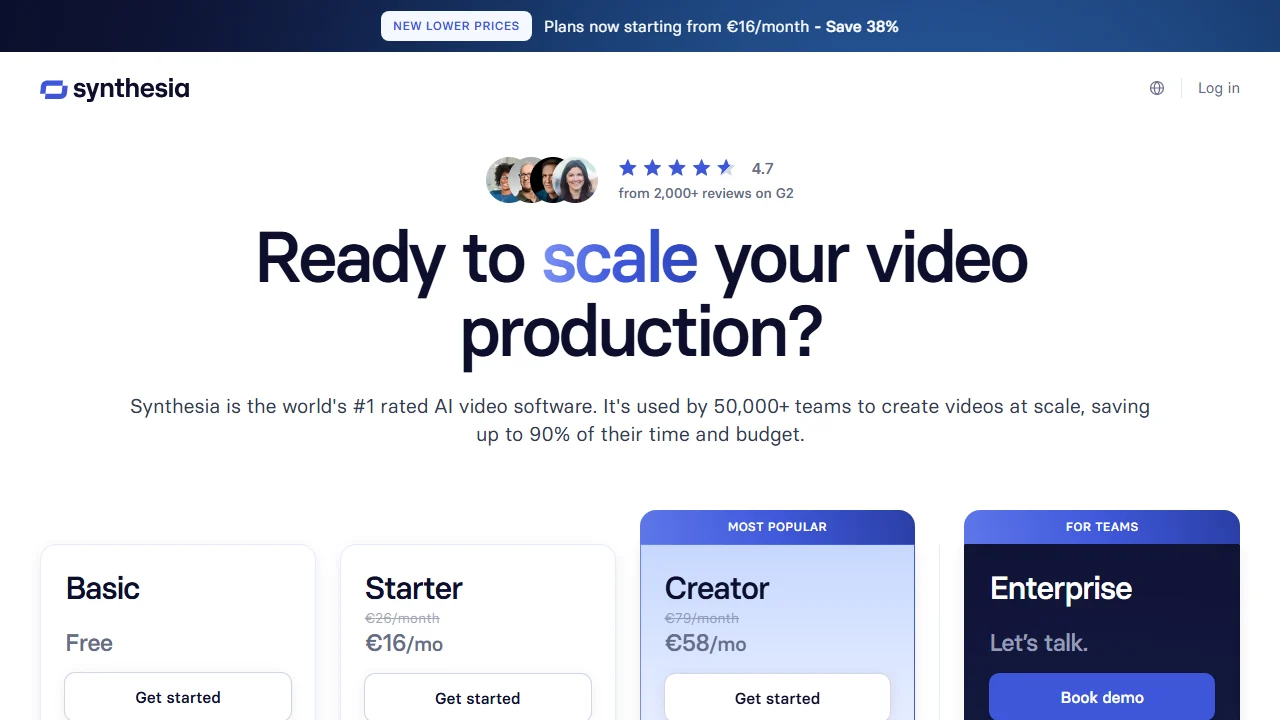
Pricing screenshot note: Synthesia prices, credits, video minutes, avatar limits, and enterprise terms can change and may vary by region, currency, taxes, billing cycle, promotions, and account type, so verify the current details on the official site before buying.
5. InVideo AI, Pictory, and VEED
These tools are useful for simple social videos, repurposing content, adding captions, and building video assets from existing text or footage.
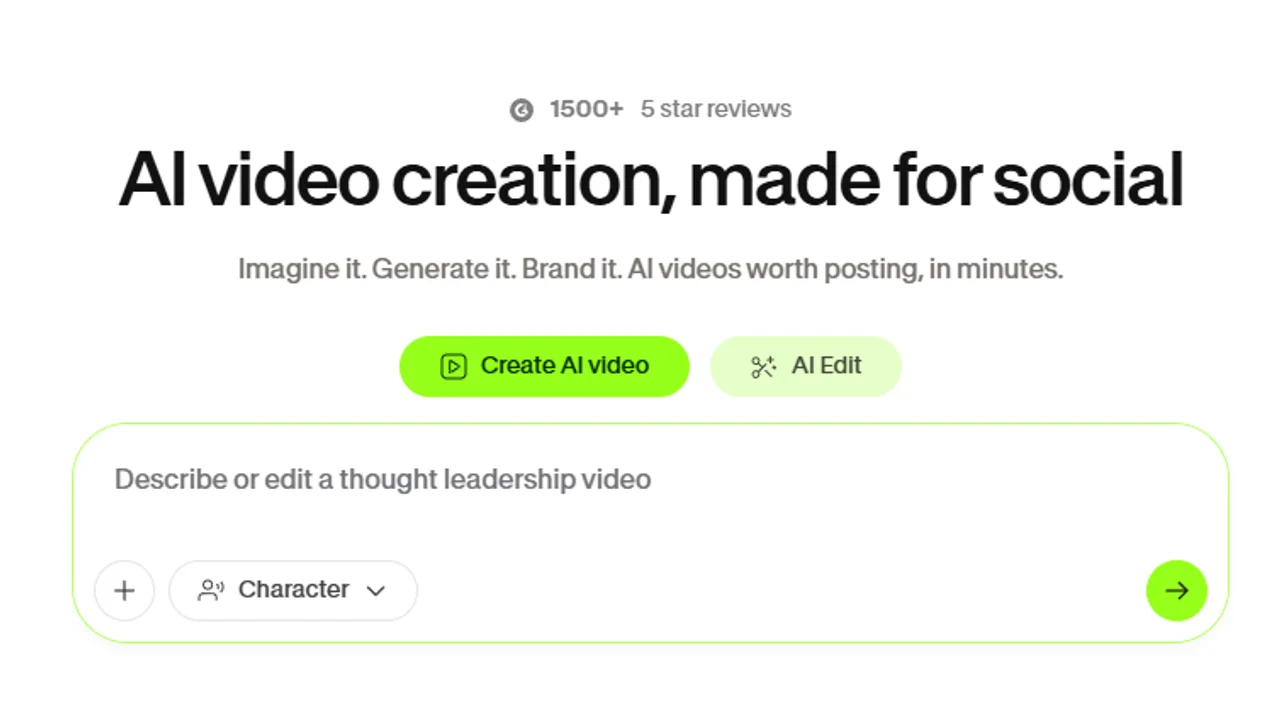
InVideo AI is useful when the priority is fast assembly from prompts, scripts, or existing assets rather than a deeply product-specific ecommerce workflow.

For the editing and captioning side of that workflow, VEED is useful when you already have a product clip or AI-generated draft and need to polish it for social platforms.
Best for
- Social cutdowns.
- Product roundups.
- Basic video assembly.
- Content repurposing.
Watch out for
Template videos can feel generic. Add specific product visuals, tighter hooks, and a real offer.
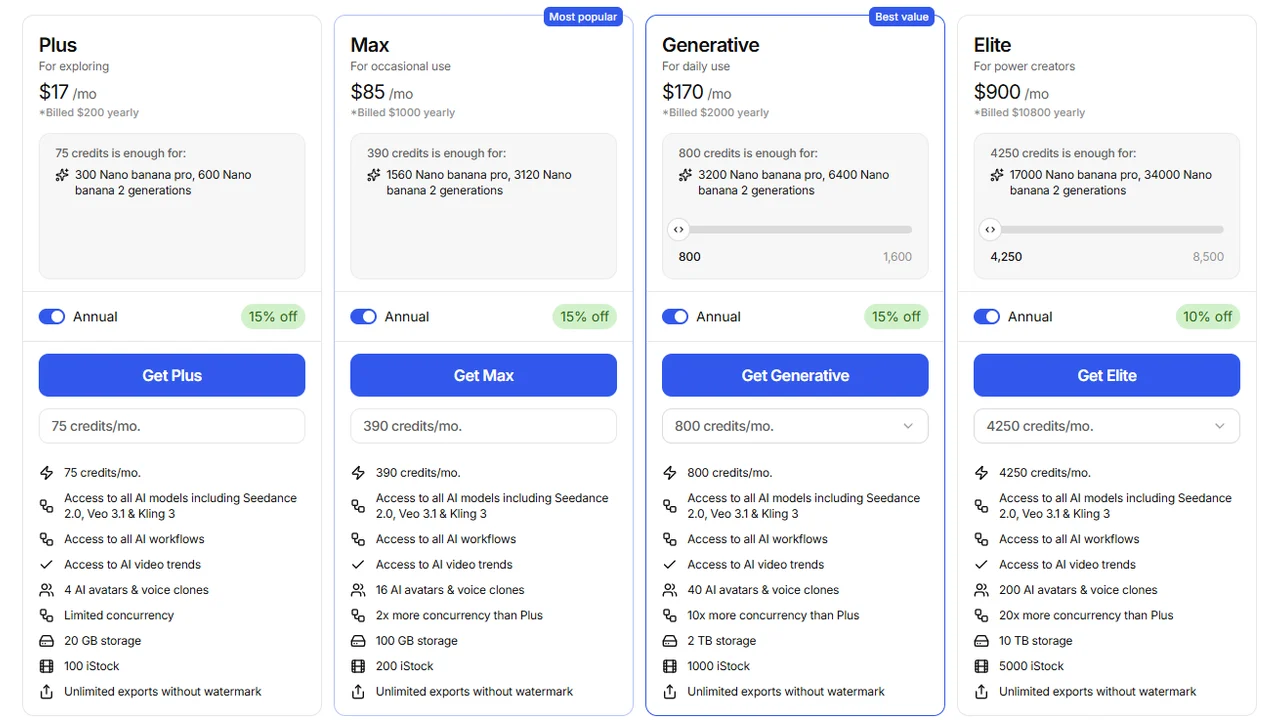
Pricing screenshot note: InVideo prices, credits, and plan limits can change and may vary by region, currency, taxes, billing cycle, promotions, and account type, so verify the current details on the official site before buying.
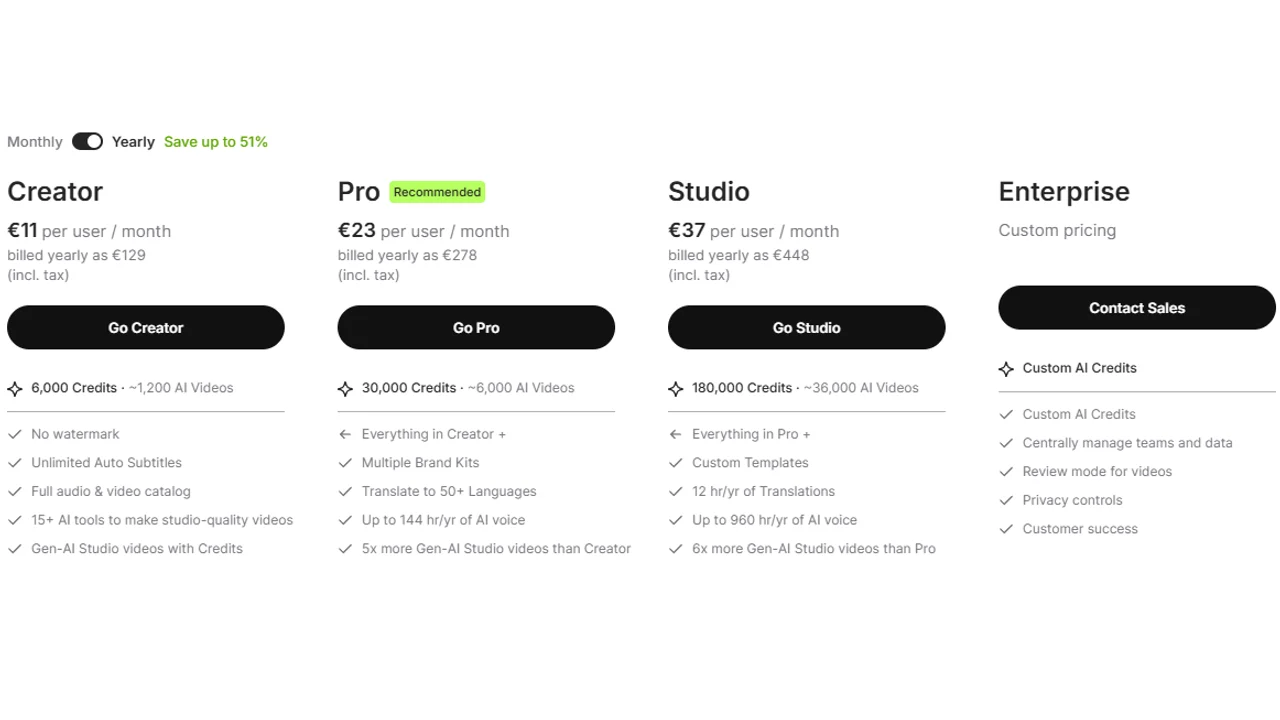
Pricing screenshot note: VEED prices, plan names, and usage limits can change and may vary by region, currency, taxes, billing cycle, promotions, and account type, so verify the current details on the official site before buying.
Generating video for a whole catalog
The hard part of ecommerce video is not one clip, it is a hundred. If you sell a large catalog, look for tools that read a product URL or feed and batch-generate a video per SKU, then let you swap the hook, aspect ratio, and language per placement. Creatify leans into the product-URL workflow, while editing-first tools like VEED suit polishing a smaller set by hand. Decide by catalog size: dozens of products favor templated batch generation, a few hero products favor manual craft.
How to choose
- Need a product ad quickly? Start with Creatify.
- Need product-video-specific tools? Read best AI product video generators.
- Need the ecommerce ad strategy? Read AI video ads for ecommerce.
- Need AI UGC for ecommerce? Compare Arcads and HeyGen.
- Need avatar explainers? Try HeyGen or Synthesia.
- Need simple social videos? Try InVideo AI or VEED.
- Need a broader list? Read the AI video ad generator guide.
Ecommerce video checklist
Before publishing, check:
- The product is visually accurate.
- The offer is easy to understand.
- The first three seconds are strong.
- Captions are readable on mobile.
- The CTA matches the landing page.
- Claims are true and supportable.
- The format fits TikTok, Meta, YouTube, or the product page.
FAQ
Which AI tool works for ecommerce videos?
Creatify is a strong first option for products. Arcads works for UGC. HeyGen and Synthesia work for avatar explainers.
Can I create Shopify videos with AI?
Yes. You can use URLs, photos, and descriptions to generate product ads or videos, but you must check accuracy and rights.
Which format works best in ecommerce?
It depends on the product. Test a demo, a UGC version, and a short explainer. Performance decides.
What should I check before publishing?
Product accuracy, claims, offer, captions, CTA, format, and any use of synthetic content.
Final recommendation
For most ecommerce brands, start with a product video workflow, then add UGC-style and avatar variants once the core message is clear.