
Quick verdict
The best AI product photo generator depends on the asset you need:
- For fast product cleanup and background changes: Photoroom.
- For lifestyle product scenes: Pebblely.
- For brand-controlled creative scenes: Flair.ai.
- For image enhancement and product cleanup: Claid.ai.
- For simple social and ad layouts: Canva Magic Studio.
Use these tools to produce more product visuals faster, not to hide product flaws. Your best results will still come from a clean original product image, a specific prompt, and a final human review before publishing.
Comparison table
| Tool | Best for | Strength | Limit to watch |
|---|---|---|---|
| Photoroom | General e-commerce product images | Fast cleanup, backgrounds, batch workflows | Creative control can feel template-driven |
| Pebblely | Lifestyle product visuals | Simple product-to-scene generation | Requires review for realism and product accuracy |
| Flair.ai | Brand-led scenes | More visual direction and campaign-style layouts | Takes more setup than basic background tools |
| Claid.ai | Product image improvement | Enhancement, consistency, catalog workflows | Less focused on bold ad concepts |
| Adobe Firefly | Creative edits and generative fill | Strong general creative ecosystem | Generalist tool, not product-photo-specialized; verify product consistency |
| Canva Magic Studio | Simple ads and social assets | Easy layouts for non-designers | Less specialized for serious product shoots |
What an AI product photo generator actually does
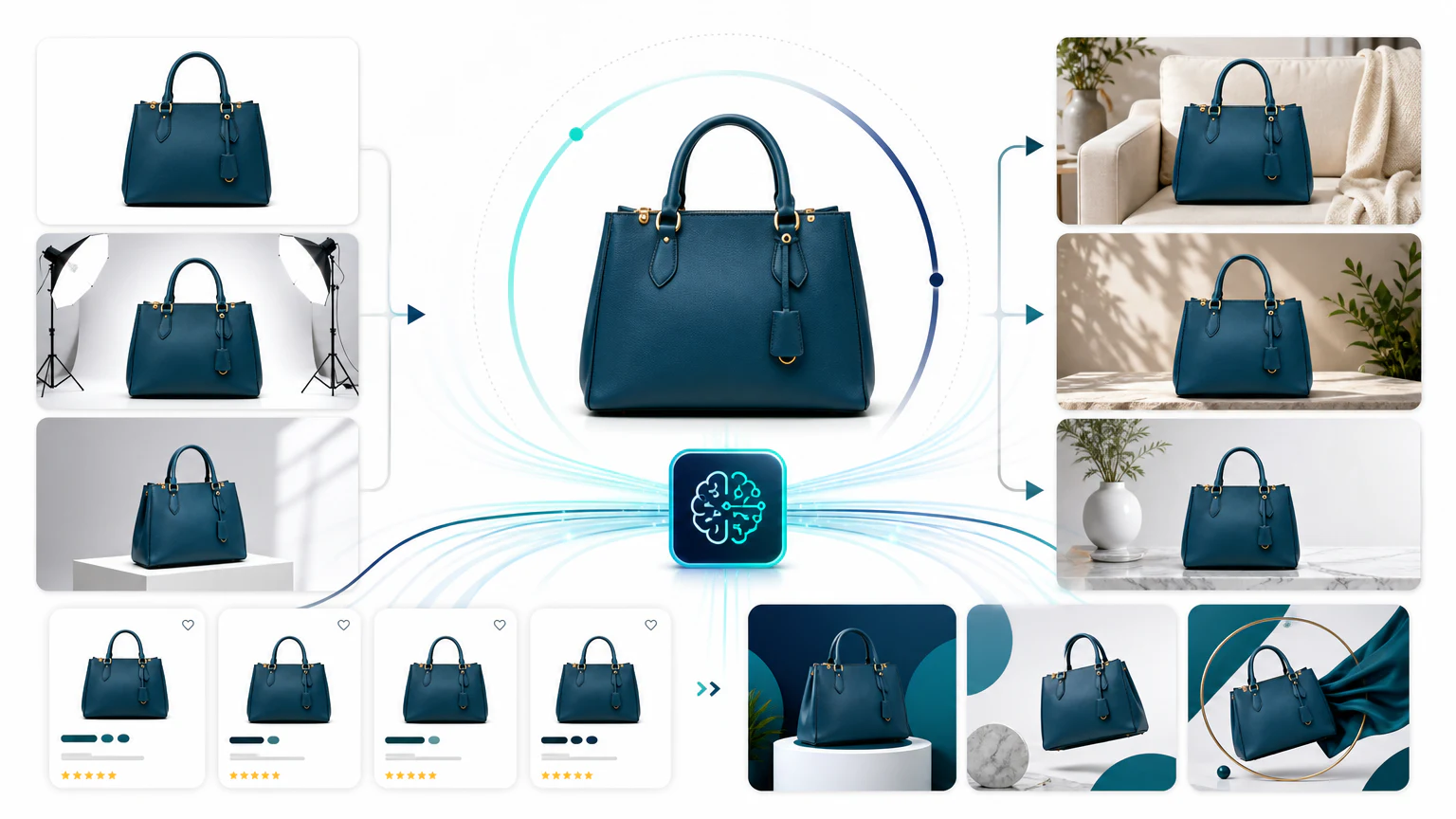
An AI product photo generator turns an existing product image into a cleaner or more marketable visual. Depending on the tool, it can remove the background, generate a new scene, add props, improve lighting, create social formats, or prepare marketplace-ready images.
The important distinction is this: a background remover changes the space around the product; a stronger product photo generator tries to create an entire marketing image while keeping the product recognizable.
For e-commerce, that difference matters. A supplement bottle, skincare jar, candle, coffee bag, or electronic accessory needs to keep its shape, label, proportions, and material texture. A beautiful image that slightly changes the product is still risky.
If you need the broader ecommerce stack beyond product photos, read best AI tools for ecommerce and Shopify.
1. Photoroom
Photoroom is a strong first tool to evaluate if you need practical product images quickly. It is especially useful for stores that need clean backgrounds, simple campaign assets, and repeatable product visuals.

Best for
- Shopify and marketplace sellers.
- Product background replacement.
- Batch cleanup for catalog images.
- Fast social and ad assets.
Watch out for
The more complex the scene, the more carefully you should inspect edges, reflections, shadows, and label details. It is a production helper, not a substitute for quality control.
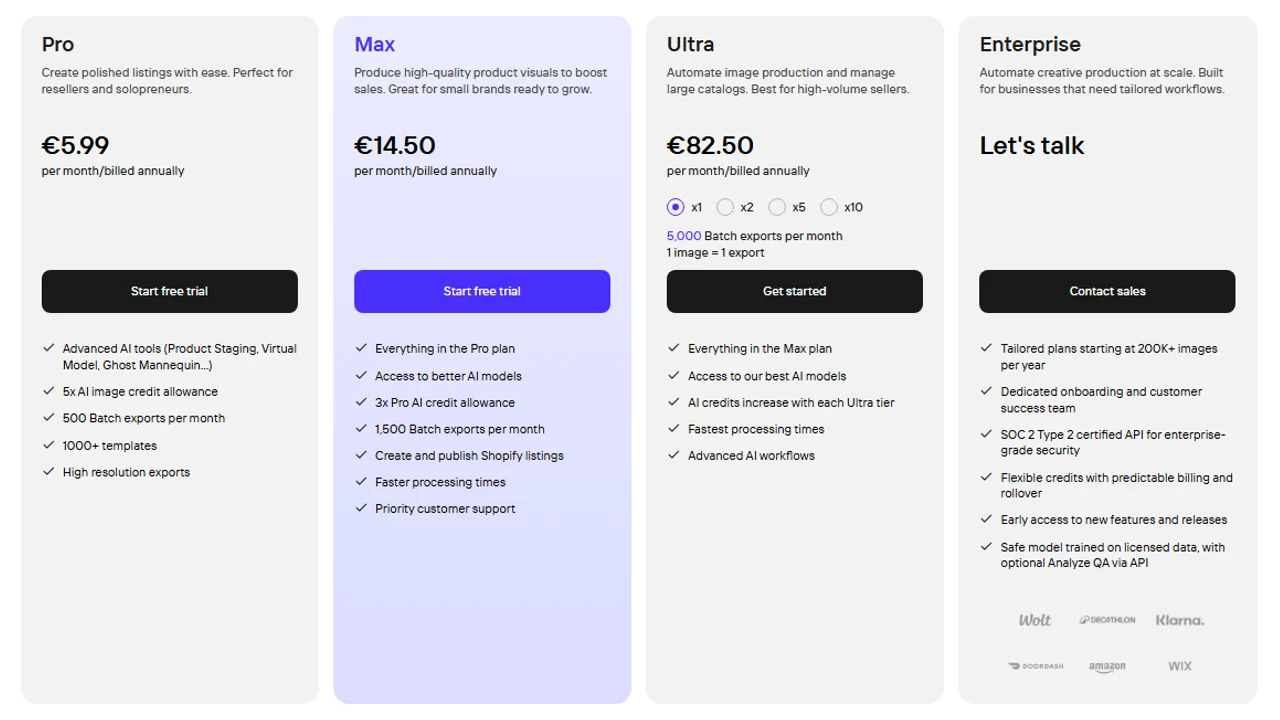
Pricing screenshot note: Photoroom prices, AI credit allowances, batch export limits, Shopify listing features, and enterprise terms can change and may vary by region, currency, taxes, billing cycle, promotions, and account type, so verify the current details on the official site before buying.
2. Pebblely
Pebblely is interesting when you want lifestyle images without arranging a physical shoot. It can help turn a plain product image into scenes for seasonal campaigns, social posts, landing pages, and ad tests.
Best for
- Lifestyle product images.
- E-commerce brands with limited photography budgets.
- Fast concept exploration.
- Products such as cosmetics, supplements, packaged goods, and gifts.
Watch out for
Do not judge only the background. Check whether the product itself still looks correct. Labels, caps, transparent bottles, reflective packaging, and clothing textures can expose weak generations.
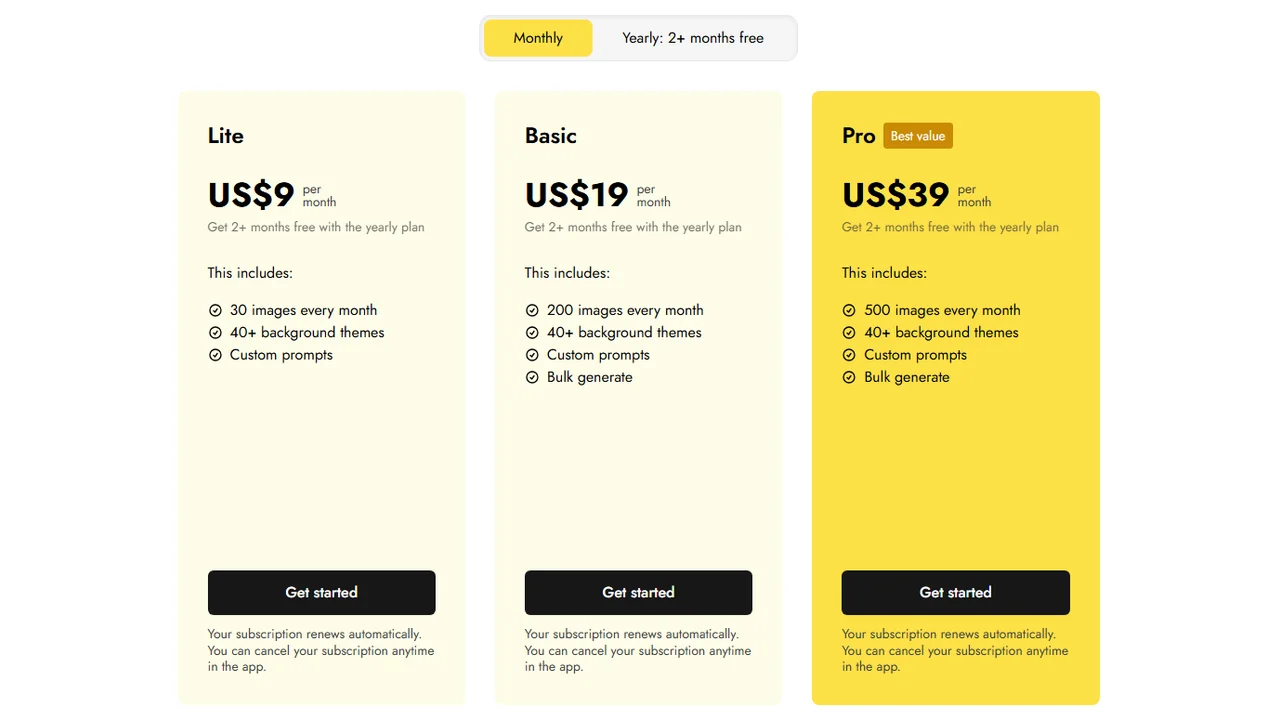
Pricing screenshot note: Pebblely prices, included monthly images, background themes, custom prompts, bulk generation, and billing options can change and may vary by region, currency, taxes, billing cycle, promotions, and account type, so verify the current details on the official site before buying.
3. Flair.ai
Flair.ai is better suited to brands that care about creative direction. Instead of only asking for a new background, you can build more intentional visual scenes around the product.

Best for
- Branded ad concepts.
- Campaign-style scenes.
- Creative teams that need more control.
- Products where mood, props, and visual consistency matter.
Watch out for
More control usually means more setup. If you only need fast white-background cleanup, a simpler tool may be enough.
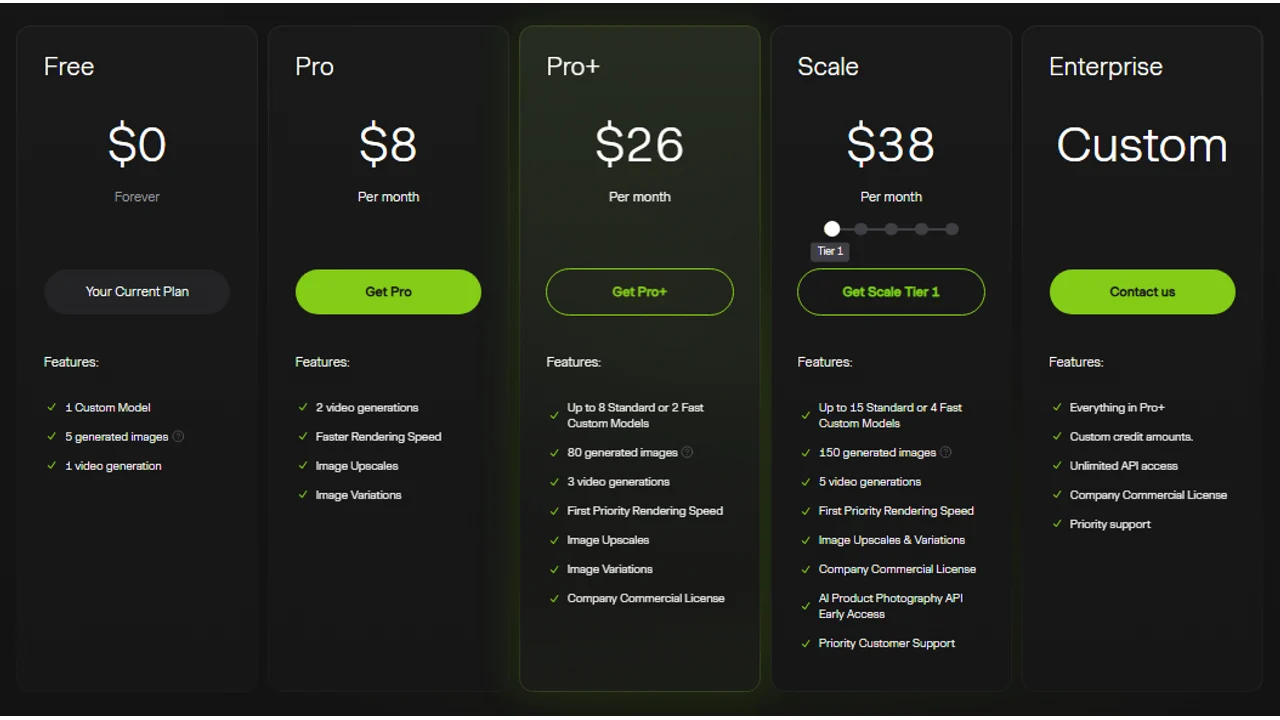
Pricing screenshot note: Flair.ai prices, generated image limits, video generation access, model limits, and API options can change and may vary by region, currency, taxes, billing cycle, promotions, and account type, so verify the current details on the official site before buying.
4. Claid.ai
Claid.ai is worth considering when the priority is product image quality, cleanup, and catalog consistency. It fits a different need than tools focused on dramatic lifestyle scenes.
Best for
- Image enhancement.
- Product cleanup.
- Catalog consistency.
- E-commerce teams managing many SKUs.
Watch out for
If your main goal is bold creative ads, compare it with more campaign-oriented tools before choosing.
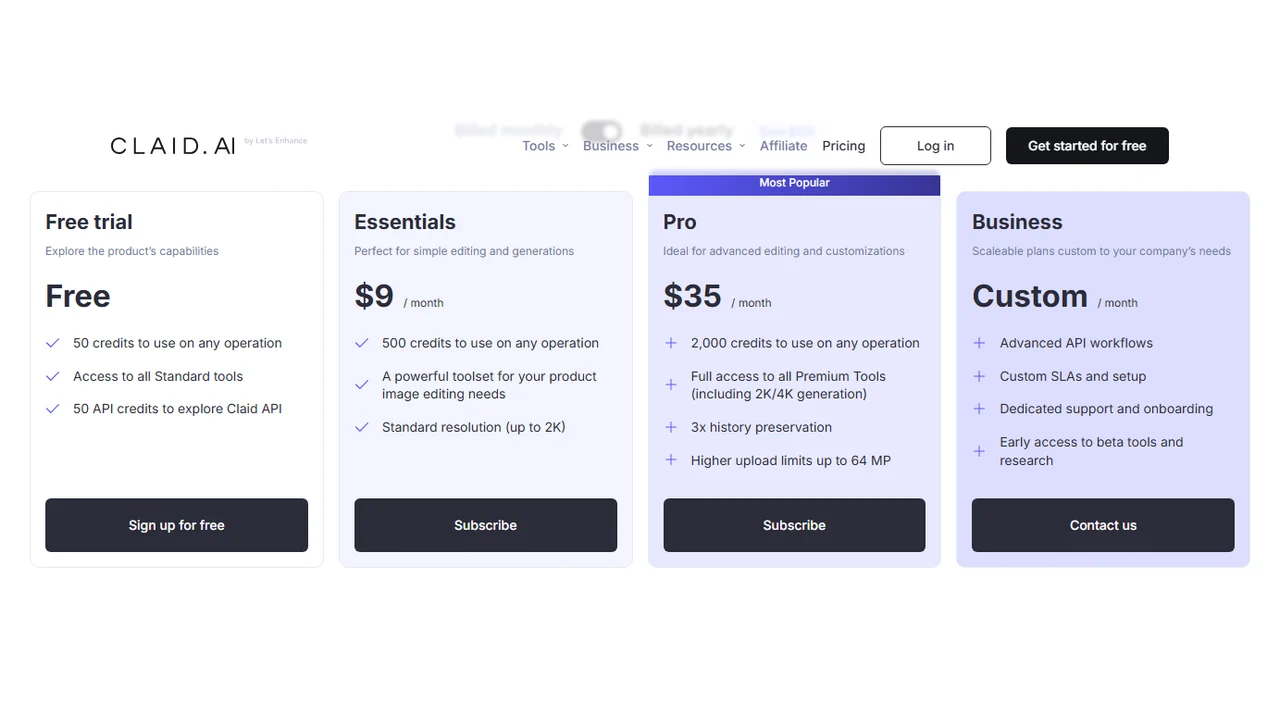
Pricing screenshot note: Claid.ai prices, credits, and plan limits can change and may vary by region, currency, taxes, billing cycle, promotions, and account type, so verify the current details on the official site before buying.
5. Adobe Firefly
Adobe Firefly can help with generative edits, backgrounds, and creative variations, especially if your team already works inside the Adobe ecosystem. It is better framed as a general creative AI tool than as a dedicated ecommerce product photo generator.

Best for
- Designers who need AI-assisted edits.
- Generative fill and creative retouching.
- Campaign visuals that need manual polish.
Watch out for
For product photography, the key question is not whether the image looks beautiful. It is whether the product remains accurate enough to use commercially. For catalog-scale ecommerce work, compare Firefly against product-photo-specific tools before relying on it as the main workflow.
Pricing note: Adobe pricing varies significantly by Creative Cloud plan, region, currency, taxes, billing cycle, promotion, and whether Firefly credits are included, so verify the current Adobe plan details before buying.
6. Canva Magic Studio
Canva is not only an AI product photo generator, but it is useful for turning product visuals into simple ads, banners, and social media posts.

Best for
- Beginners.
- Simple ad creatives.
- Social media assets.
- Teams without a designer.
Watch out for
Canva is convenient, but specialized product photo tools usually give you more control over product-specific generation.
Pricing note: Canva pricing and AI feature access can vary by plan, region, currency, taxes, billing cycle, promotions, team type, and rollout status, so verify the current Canva plan details before buying.
How to choose
Choose by workflow, not by hype:
- Need fast store images? Start with Photoroom.
- Need lifestyle scenes? Try Pebblely.
- Need brand-controlled campaign visuals? Try Flair.ai.
- Need image cleanup and consistency? Try Claid.ai.
- Need layouts for ads and posts? Use Canva after generating the product image.
If you are building a full ad workflow, product images are only the first layer. After that, you can turn them into static, video, and UGC ad concepts or follow a complete AI ad creation workflow.
Product photo quality checklist
Before publishing an AI-generated product image, check:
- The product shape is unchanged.
- The label text is not distorted.
- Shadows match the scene.
- Reflections look physically plausible.
- The product scale makes sense.
- No extra logos, marks, or fake claims appear.
- Marketplace rules are respected.
- The image does not misrepresent the product.
FAQ
What is the best AI product photo generator?
It depends on the job. Photoroom and Pebblely are strong for backgrounds and product scenes, Canva for quick layouts, and AdCreative.ai when the photo is part of an ad.
Can AI product photos be used on Amazon or Shopify?
Yes, but check each marketplace’s image rules and make sure the photo does not misrepresent the product, its size, color, or included parts.
Are AI product photos allowed in ads?
Generally yes, as long as they are accurate and not misleading. Avoid altering the product itself; enhance the scene, lighting, or background instead.
Do I still need real product photos?
Yes. Start from a real photo of the actual product, then use AI to clean the background, relight, or place it in a scene. AI should improve real photos, not invent the product.
Final recommendation
AI product photo generators are strongest when you already have a clean product image and need more creative variations. They are weaker when the product is complex, transparent, reflective, fabric-based, or covered with small text.
Start with one product, create the same scene in two or three tools, and compare accuracy before paying for a full workflow.