
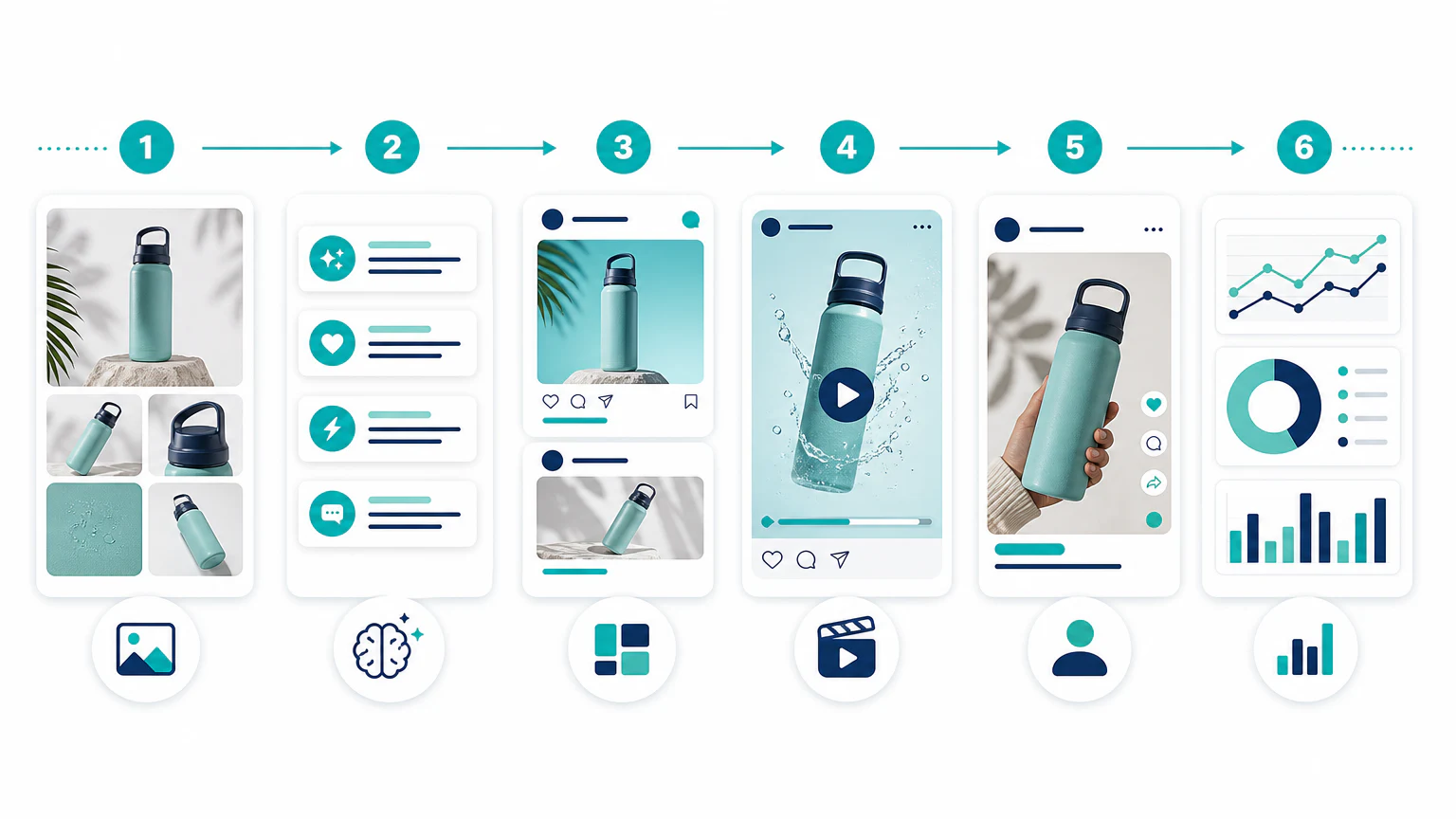
If you want to know how to create ads with AI, start with the offer, the product visual, and one clear audience before opening any generator. AI can help draft hooks, images, static ads, video ads, and UGC-style scripts, but the strongest workflow still uses human review before launch.
Quick workflow
To create ads with AI, follow this order:
- Create or improve product visuals.
- Generate ad angles and copy.
- Build static ad creatives.
- Create short video ads.
- Create UGC-style variants.
- Test, review, and optimize.
AI can speed up production, but it does not replace the fundamentals: a clear offer, a specific audience, accurate claims, and a reason to click. The goal is not just to generate ads with AI; it is to create ads that are clear enough to test.
30-second answer
The fastest way to create ads with AI is to separate the workflow into five jobs: product image, ad angle, copy, creative format, and testing. Do not ask one tool to do everything perfectly. Use one prompt to define the audience and offer, another to generate hooks, and then choose the right creative tool for the format.
| Ad job | Best AI use | Human review needed |
|---|---|---|
| Product image | Backgrounds, crops, clean product visuals | Product accuracy and realism |
| Ad copy | Hooks, angles, CTA variations | Claims, tone, and compliance |
| Static creative | Layouts, social ad variants, brand templates | Readability and brand fit |
| Video ad | Short scripts, product sequences, captions | Pacing, proof, and platform rules |
| UGC-style ad | Creator-style scripts and presenter drafts | Disclosure, authenticity, and trust |
If you only have time for one test, create three hooks for the same product visual: one problem hook, one benefit hook, and one curiosity hook. Keep the landing page and audience the same so the test measures the ad idea, not five variables at once.
Before you generate anything
AI ad tools work better when the brief is specific. Before you create ads using AI, write down:
- the product,
- the audience,
- the main pain point,
- the offer,
- the proof you can actually support,
- the channel where the ad will run,
- the action you want the viewer to take.
Bad input usually creates generic ads. A vague prompt like “make an ad for my product” produces broad copy because the tool has to guess the audience, angle, and promise. A tighter prompt gives the AI enough constraints to create something testable.
Use this starter brief:
Product:
Audience:
Main problem:
Desired outcome:
Offer:
Proof or reason to believe:
Platform:
Ad format:
Claims to avoid:
Brand tone:
Step 1: Create product visuals
Before writing ads, make sure the product looks good. Many campaigns fail because the image is weak, unclear, or too similar to every competitor.
Tools to evaluate:
If you sell a skincare serum, for example, you could create:
- a clean white-background product image,
- a bathroom counter lifestyle scene,
- a premium spa scene,
- a seasonal gift image,
- a square social ad version.
The goal is not to generate random beautiful images. The goal is to create visuals that show the product accurately and make the offer easier to understand.
For tool options, start with the AI product photo generator comparison.
Step 2: Generate ad angles and copy
Once the visuals are ready, use an AI writing assistant to explore different messages.
Tools to evaluate:
- ChatGPT,
- Claude,
- Jasper,
- Gemini.
A useful prompt:
Write 12 ad hooks for a skincare serum.
Audience: women aged 30-50 who want a simple daily routine.
Tone: clear, specific, not exaggerated.
Avoid medical claims and unrealistic results.
Give hooks for problem, benefit, curiosity, comparison, and routine angles.
Strong ad copy usually starts with an angle, not a sentence. Examples of angles:
- problem-focused,
- outcome-focused,
- routine-focused,
- comparison-focused,
- objection-focused,
- social-proof-focused.
Generate more options than you need, then cut aggressively.
Prompt for ad angles
Use this when you need strategic options before creating the final ad:
Create 20 ad angles for this product.
Product:
Audience:
Pain point:
Offer:
Platform:

Group the angles by:
- problem,
- benefit,
- curiosity,
- comparison,
- objection,
- social proof.

For each angle, include one hook, one supporting line, and one CTA.
Avoid unsupported claims.
Prompt for static ad copy
Write 10 static ad copy options for this product.
Use a short hook under 8 words.
Add one clear benefit.
Add one CTA.
Make the copy readable on mobile.
Do not use hype, medical claims, or fake scarcity.
Step 3: Create static ad creatives
Static ads are still useful because they are fast to produce, easy to test, and compatible with many platforms.
Tools to evaluate:
- AdCreative.ai,
- Canva,
- Predis.ai,
- Picmaker MAD,
- Meta Advantage+ Creative for adapting assets inside Meta Ads Manager,
- Google asset tools.
This step matches searches like “AI ad maker,” “AI ad creative generator,” “AI Facebook ad generator,” and “AI generated ads.”
A simple static ad structure:
- product visual,
- short hook,
- one benefit,
- clear CTA,
- brand or offer cue.
Example:
Hook: Your 60-second skincare routine.
Benefit: Hydration without a complicated shelf.
CTA: Shop the daily serum.
Avoid cramming too much text into the image. On mobile, the user should understand the ad in a glance.
For a broader tool list, read the AI ad generator buyer guide.
Step 4: Create video ads
Video ads help you show motion, sequence, product usage, and benefits more naturally. You do not need a long video; many effective concepts can be short.
Tools to evaluate:
- Creatify,
- InVideo AI,
- Pictory,
- Runway,
- Pika.
This step matches searches like “AI video ad generator,” “AI video ad creator,” “AI video ad maker,” “AI product video generator,” and “AI marketing video generator.”
A basic video ad structure:
- Hook: stop the scroll.
- Product: show what it is.
- Benefit: explain why it matters.
- Proof or reason: give context.
- CTA: tell the viewer what to do next.
Example script:
Scene 1: "Still using five products every morning?"
Scene 2: Show the serum on a clean bathroom counter.
Scene 3: "One simple step for daily hydration."
Scene 4: Show texture or application.
Scene 5: "Try the daily serum today."
If video is the main channel, compare the best AI video ad generators.
Prompt for AI video ads
Create a 15-second video ad script.
Product:
Audience:
Problem:
Benefit:
Offer:
Platform:

Use 5 scenes:
1. Hook
2. Product reveal
3. Benefit
4. Proof or reason to believe
5. CTA

Include on-screen text and voiceover for each scene.
Keep each line short enough for mobile video.
For narrower workflows, use the platform-specific guides:
- How to create ecommerce video ads with AI
- How to create product videos with AI
- How to create TikTok ads with AI
- How to create Facebook ads with AI
Step 5: Create UGC-style variants
UGC-style ads can be useful because they feel closer to social content than polished brand commercials. AI can help generate scripts, presenters, and variations quickly.
Tools to evaluate:
This step matches searches like “AI UGC ad generator,” “AI UGC video generator,” and “AI avatar ads.”
A simple UGC-style script:
I wanted a skincare routine I could actually stick to.
This serum keeps it simple: one step after cleansing.
No complicated routine, no long list of products.
If you want something easy for daily hydration, this is worth a look.
Important: do not use AI UGC to invent fake customer experiences. If a presenter is synthetic, treat disclosure and platform rules as part of production.
For dedicated tools, see the AI UGC ad generator comparison.
Prompt for UGC-style ads
Write 6 UGC-style ad scripts for this product.
Audience:
Product:
Problem:
Offer:
Tone: natural, specific, not overacted.

Use these formats:
- problem-solution,
- before-after routine,
- objection handling,
- founder explanation,
- product demo,
- listicle.

Do not invent a fake customer experience.
Step 6: Test and optimize
AI makes it easy to create too many assets. That can become noise if you do not test systematically.
Start with a small matrix:
| Variable | Version A | Version B | Version C |
|---|---|---|---|
| Hook | Problem | Benefit | Curiosity |
| Format | Static | Video | UGC-style |
| Visual | Clean product | Lifestyle | Demo |
| CTA | Shop now | Learn more | Try today |
Review:
- click-through rate,
- cost per click,
- conversion rate,
- cost per acquisition,
- watch time for videos,
- comments and qualitative feedback.
Do not only optimize for cheap clicks. A flashy ad that brings poor traffic is not a win.
Example workflow: skincare serum
Here is a simple way to create AI ads without turning the process into a messy pile of drafts.
- Use a product photo tool to create one clean product image and one lifestyle image.
- Ask ChatGPT or Claude for 20 hooks, then shortlist five that are specific and compliant.
- Turn the best two hooks into static ads with Canva or AdCreative.ai.
- Turn the strongest hook into a 15-second video script for Creatify or InVideo.
- Create one UGC-style script for Arcads, HeyGen, or another presenter tool.
- Launch a small test with one audience and one landing page.
- Keep the winner, then generate the next round of variations around that angle.
In this workflow, AI is doing production and variation. The marketer still chooses the offer, checks claims, reviews the creative, and decides what to test next.
Common mistakes when creating ads with AI
Starting with the tool instead of the offer
The best AI ad generator cannot fix a weak offer. If the discount, benefit, or reason to click is unclear, the ad will look polished but still underperform.
Testing too many variables at once
Do not change the audience, hook, format, landing page, and CTA in the same test. Start with one variable, usually the hook or format.
Publishing unreviewed claims
AI tools often make copy sound more confident than the evidence allows. Review product claims, health claims, savings claims, comparisons, guarantees, and testimonials before publishing.
Making every ad look synthetic
AI visuals can feel generic when every asset has the same polished look. Mix formats: clean product shots, simple static ads, creator-style scripts, and direct product demos.
Quality checklist before launch
Before publishing an AI-created ad, check:
- The product is represented accurately.
- The claim is true and supportable.
- The CTA matches the landing page.
- The creative follows platform rules.
- Text is readable on mobile.
- The brand voice feels consistent.
- Synthetic presenters or assets are handled transparently.
- The final ad has been reviewed by a human.
FAQ
Can I create ads with AI?
Yes. You can create ads with AI by using tools for product visuals, ad copy, static creatives, video scripts, UGC-style scripts, captions, and creative variations. You still need to review the offer, claims, landing page match, and platform rules before publishing.
What is the best AI tool to create ads?
The best AI tool depends on the ad format. Use AdCreative.ai or Canva for static ads, Creatify or InVideo for video ads, Photoroom or Pebblely for product visuals, and Arcads or HeyGen for presenter-led or UGC-style ads.
How do I make Facebook ads with AI?
To make Facebook ads with AI, start with one audience and one offer, generate several hooks, create static or video variants, check every claim, and test a small creative matrix in Meta Ads Manager. For a dedicated workflow, read how to create Facebook ads with AI.
Can AI generate video ads?
Yes. AI can generate video ad scripts, scenes, captions, voiceovers, avatars, product videos, and short social formats. The best results still need human review for pacing, accuracy, and whether the video matches the platform.
Should I use AI UGC ads instead of real creators?
Use AI UGC ads for fast testing, localization, and script variations. Use real creators when trust, lived experience, and authentic product proof are the main selling point. Synthetic presenters should not be used to fake customer experiences.
Final recommendation
The best AI ad workflow is modular. Use one tool for product images, another for copy, another for static ads, and another for video or UGC if needed.
If you are building a trust-led workflow, read UGC content marketing and how to get started with UGC.
Do not try to automate taste, offer strategy, or trust. Use AI to create more drafts, then use judgment to decide what deserves to reach customers.